SWSO Beat Factory app icon

New · beats, sounds & whole tracks

Click the squares. Hear a track.

SWSO Beat Factory by Streetwise Software Online · SWSO

Every sound you hear is made inside the app — the drums, the bass, the lead — so there is nothing else to buy and nothing else to install. Build the beat on a grid, shape the sound yourself, mix it, and save a real audio file. No account, no subscription, and nothing leaves your Mac. Opens in the Neon Factory theme, with 11 more to choose from.

$19.99 one-time purchase · 7-day free trial

Mac • macOS 14 or later • Intel and Apple silicon • 7-day free trial

macOSavailableWindowscomingMobilecoming soon
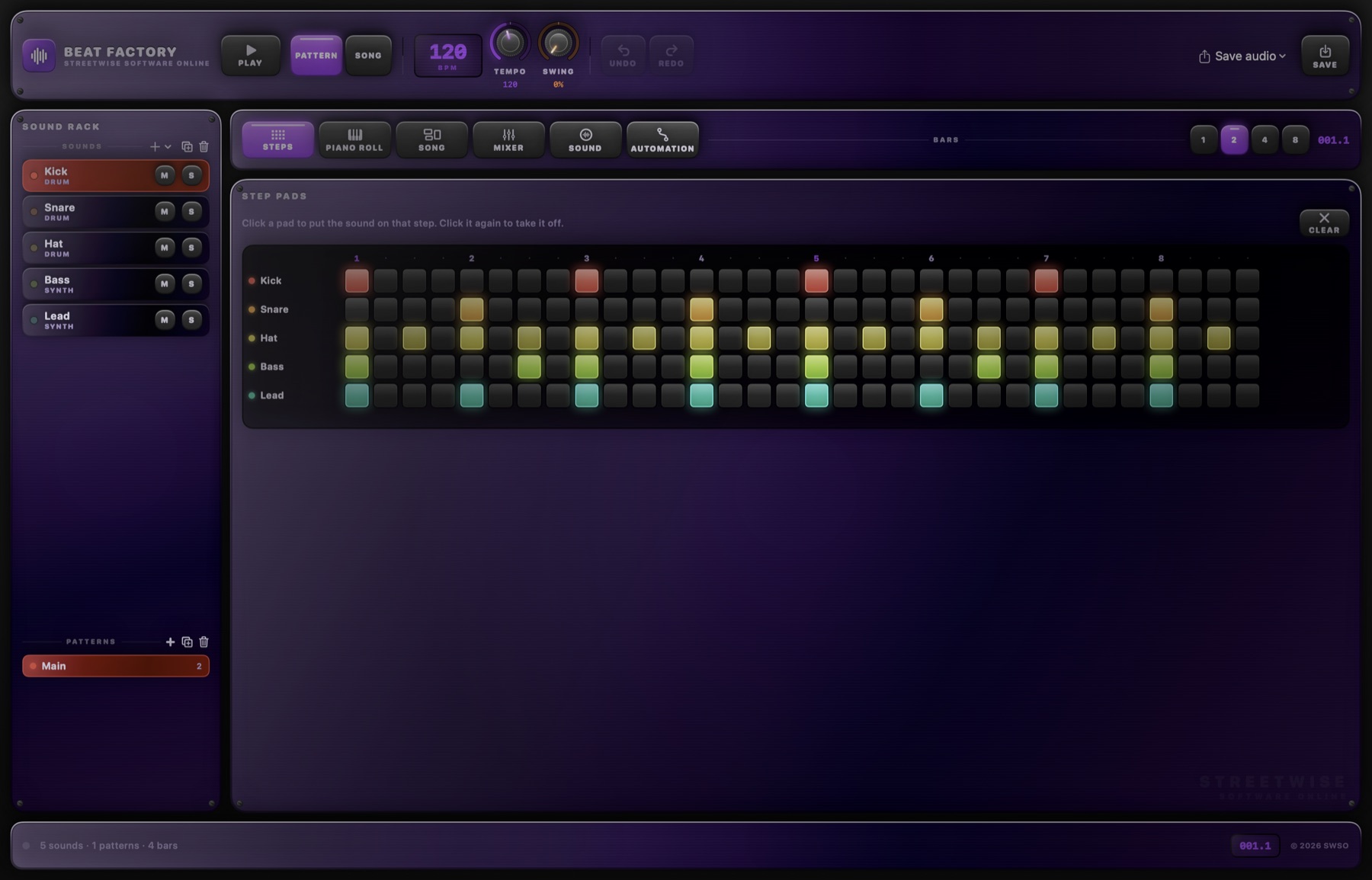
SWSO Beat Factory on the Steps view: kick, snare, hat, bass and lead rows with coloured squares across eight bars, tempo 120 and a swing control at the top
4 kinds of soundsynth, FM, nine synthesized drums and a sampler — all made inside the app
6 viewsSteps, Piano Roll, Song, Mixer, Sound and Automation, in one window
WAV, AIFF, M4Areal audio files rendered note by note — whole song, one pattern, or stems

The six views

One window, six tabs. The switch at the top says what Play does: Pattern loops the one you are editing, Song plays the whole arrangement.

The Steps view with one row per sound and one square per sixteenth note

Steps

The quickest way to build a beat. One row per sound, one square per sixteenth; four squares make a beat. Click a square to put a hit there, click it again to take it away. Patterns can be 1, 2, 4 or 8 bars.

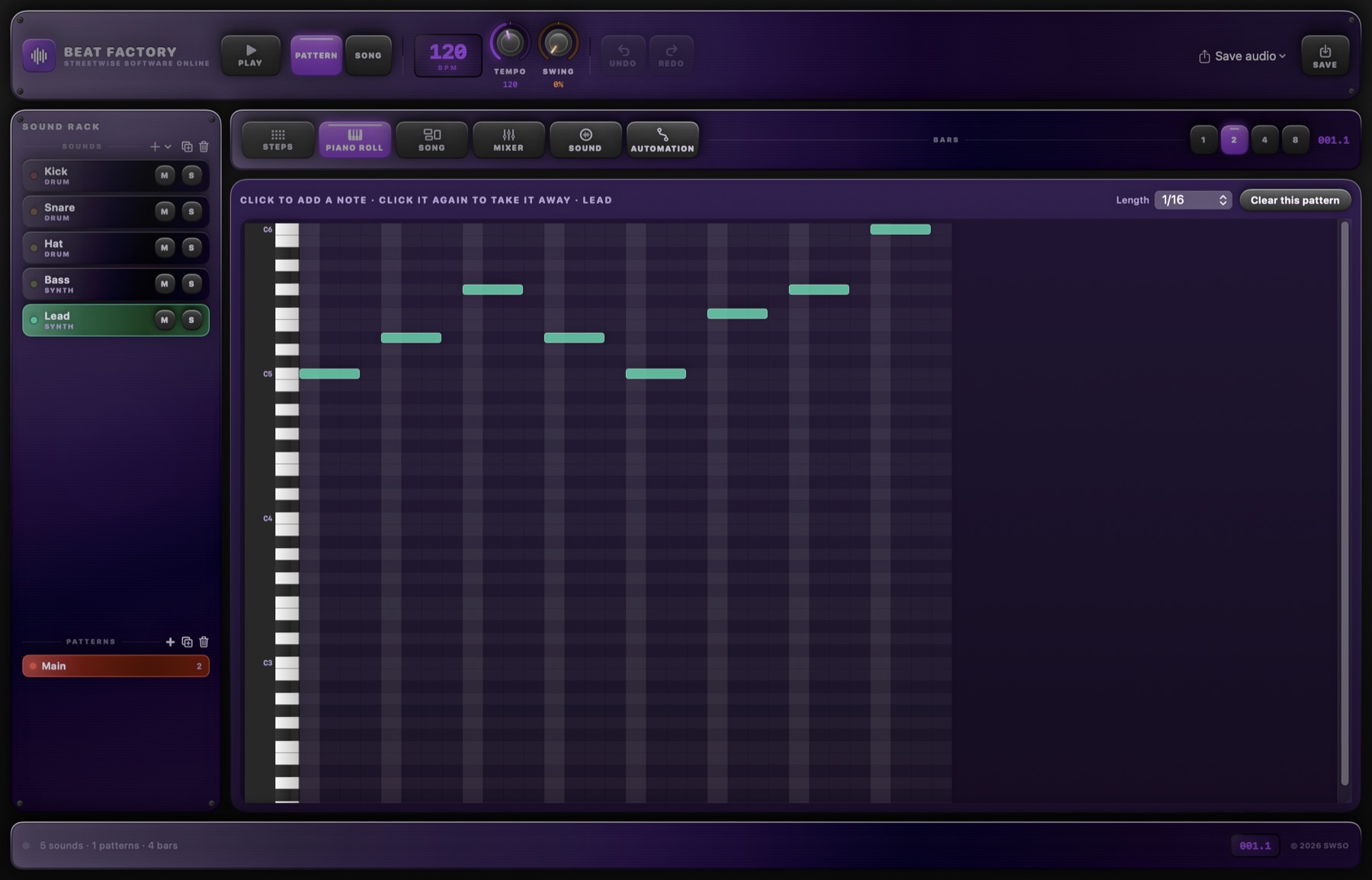
The Piano Roll view with green notes on a keyboard grid and a note-length picker set to one sixteenth

Piano Roll

Notes of any length and any pitch for the sound chosen on the left. Pick the length at the top right, then click; click a note again to take it away. This is where a bassline or a melody gets written.

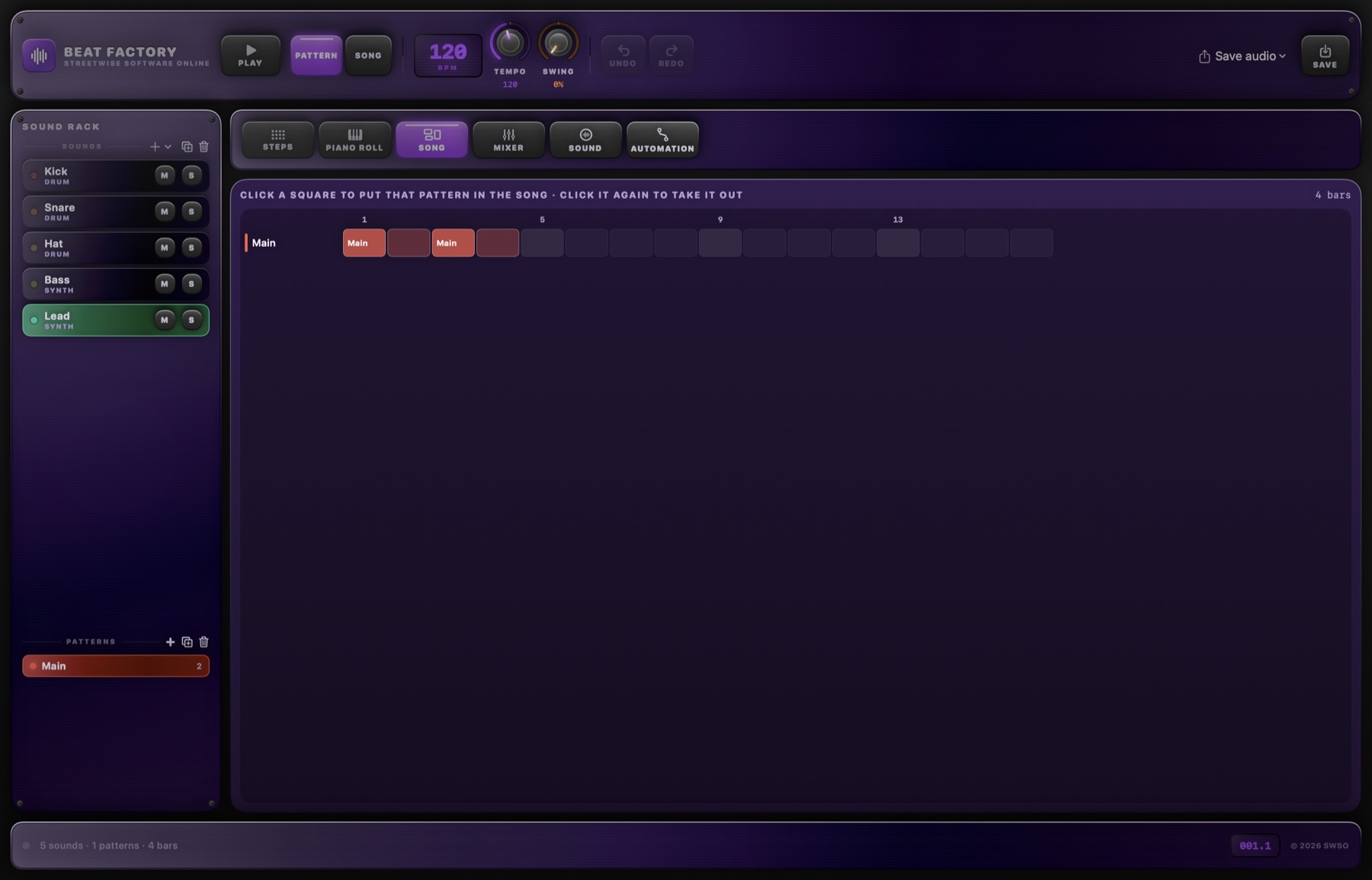
The Song view with a pattern called Main placed twice on a four-bar timeline

Song

Patterns on a timeline, one row per pattern. Click a square to place that pattern at that bar. Two patterns at the same bar play together — that is how a chorus is built on top of a verse.

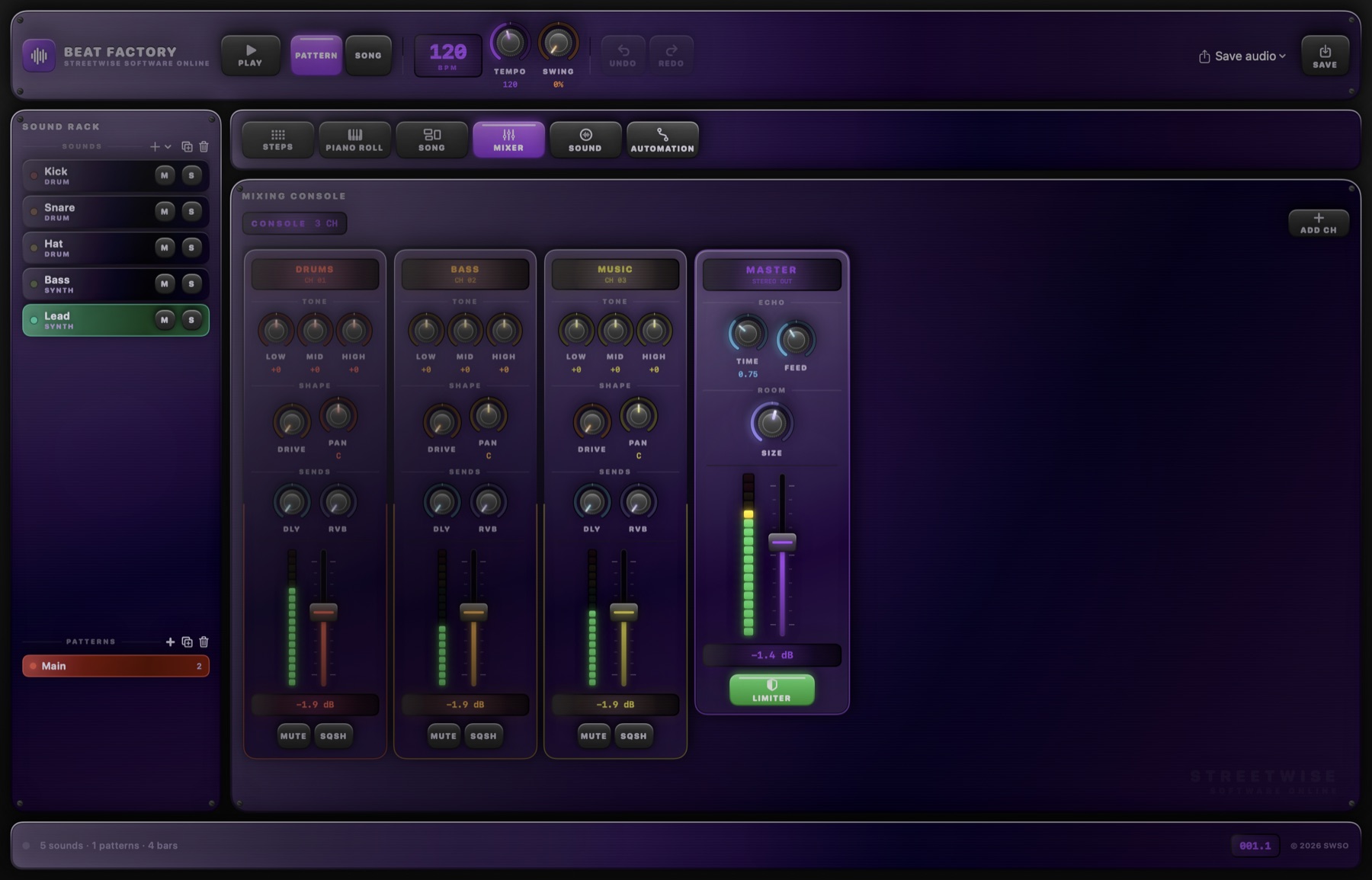
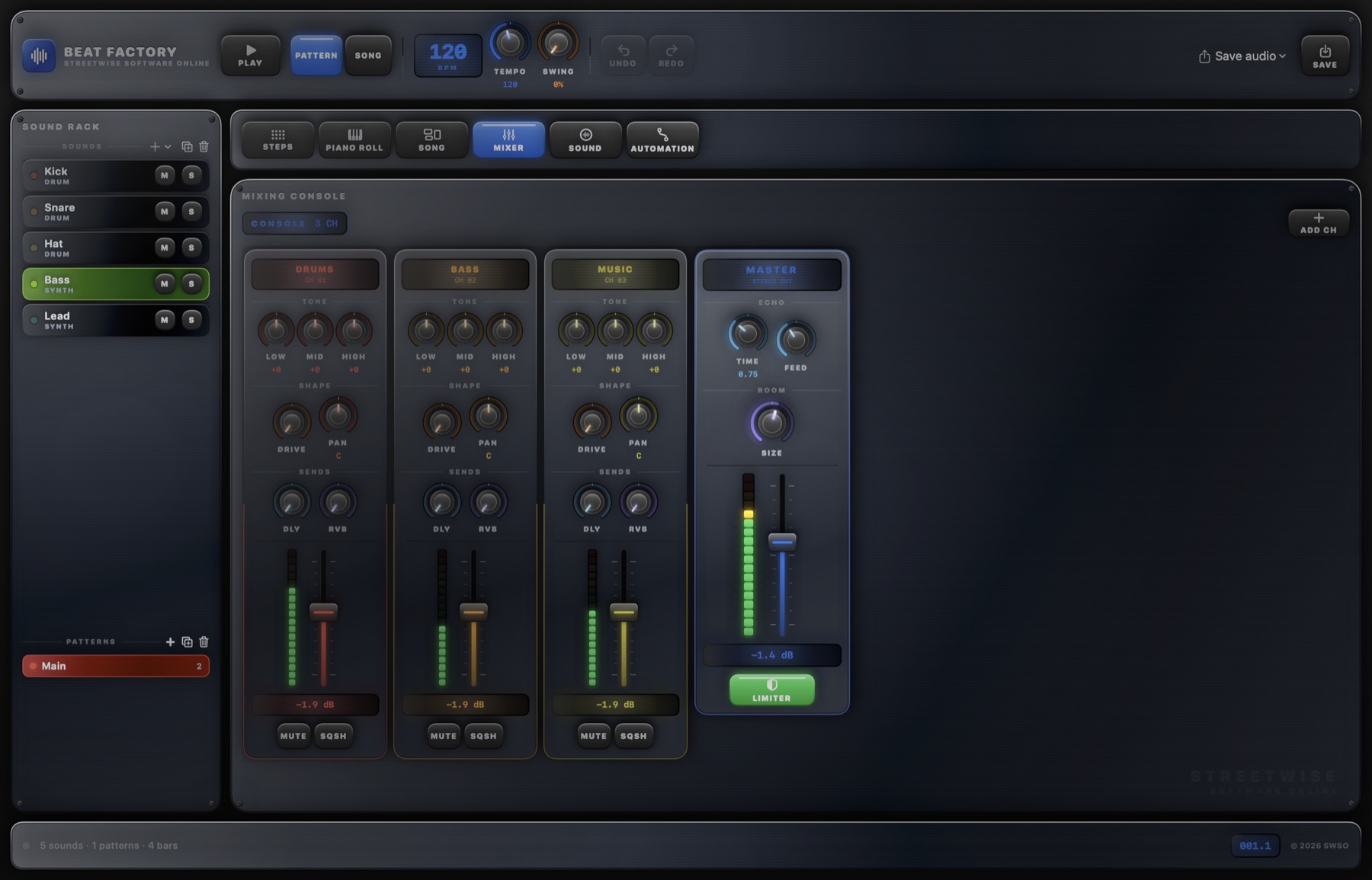
The Mixer view with Drums, Bass and Music channel strips and a Master strip with a limiter

Mixer

A channel strip for every channel: fader and meter in decibels, pan, Low / Mid / High tone, Drive, Delay and Reverb sends and a Squash compressor. The master strip on the end has the shared delay and reverb settings and a limiter.

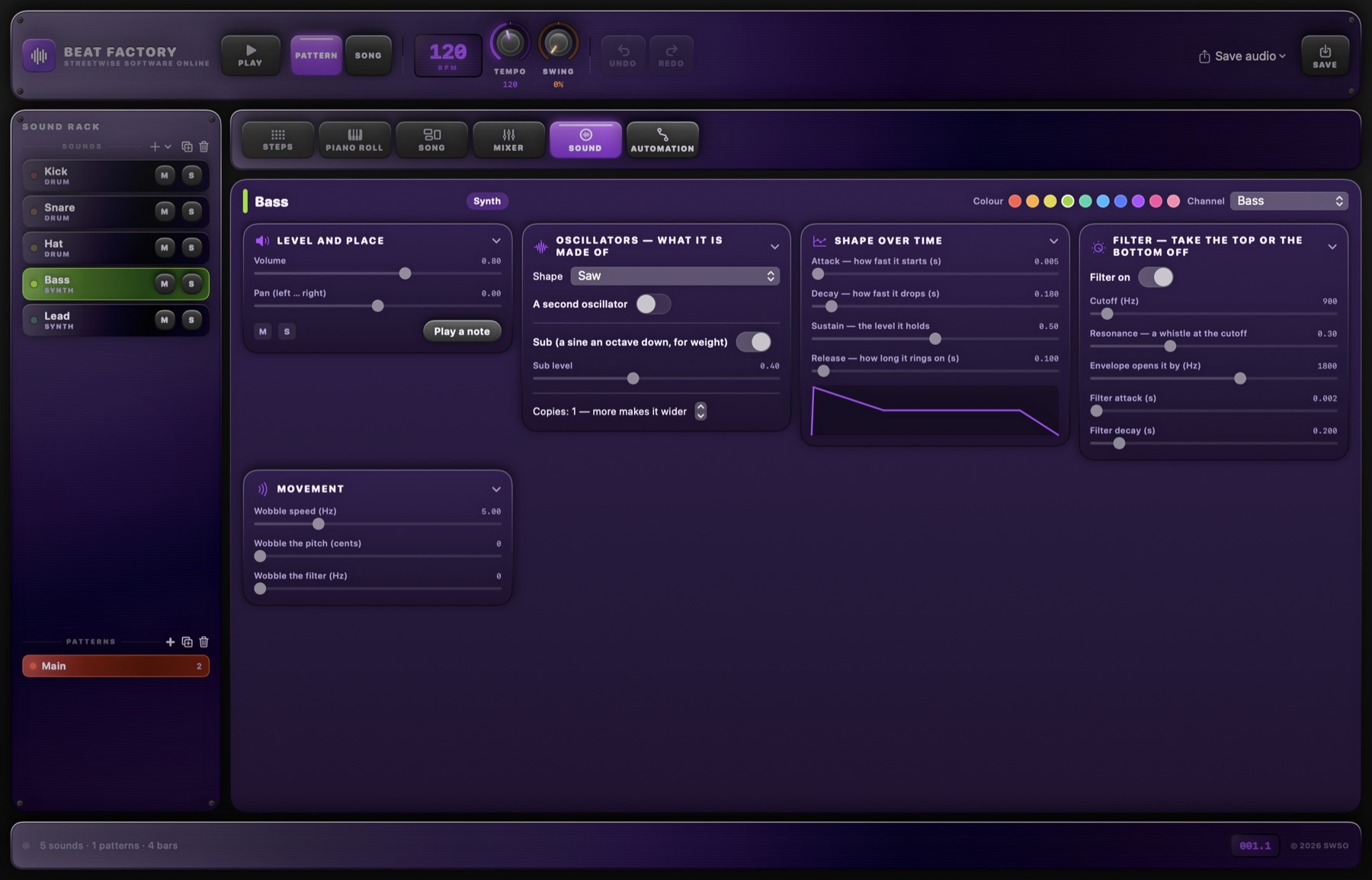
The Sound view for a Bass synth, showing level and place, oscillators, shape over time, filter and movement panels

Sound

Everything that makes the chosen sound what it is: oscillators, shape over time with a little picture of the envelope, filter cutoff and resonance, and a wobble you can send to the pitch or the filter. ⌘K plays the sound on its own.

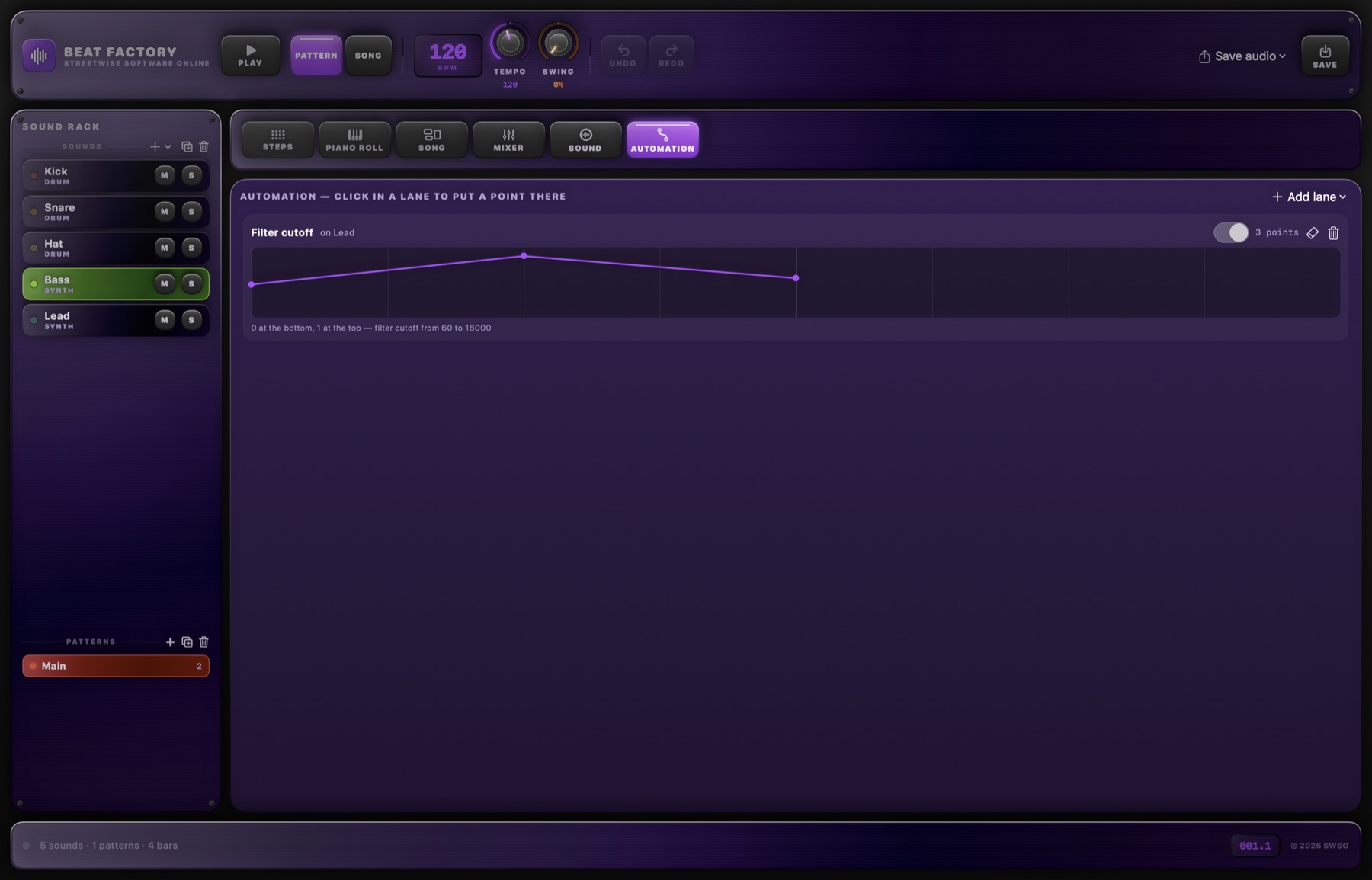
The Automation view with a Filter cutoff lane on the Lead sound and three points joined by a line

Automation

Draw a line and a control follows it through the song. Click inside a lane to put a point there, click a point to take it away, and use the switch on the right to turn a lane off without losing the line you drew.

What you get

Every sound made inside the app

  • Synth — one or two oscillators, an optional sub an octave down for weight, and up to seven copies slightly apart to make it wide
  • Shapes — sine, triangle, saw, square, pulse and noise
  • FM — one wave bends another; whole-number ratios sound musical, high amounts sound metallic
  • Drum — kick, snare, clap, closed hat, open hat, tom, rim, cowbell and crash, each made from scratch, with tuning, length and click
  • Sampler — plays a sound file you choose (WAV, AIFF, MP3 or M4A), pitched from the note you say it plays at

A real mixer

  • Per channel: a fader and meter in decibels, pan, and a gentle three-band Low / Mid / High tone control
  • Drive warms it up and then dirties it; Delay and Reverb sends feed the two shared effects
  • Squash is a compressor that evens out the loud and the quiet
  • The master strip has the overall level, the delay and reverb settings and a limiter that stops the mix crackling

Audio files you can actually use

  • Save audio writes WAV, AIFF or M4A — the whole song, just the pattern you are editing, or one file per channel
  • One file per channel is called stems: what you hand to someone finishing the track in another program
  • Rendering is done properly, note by note, not recorded off the speakers, so the file is exactly what the song is
  • Songs save as a single .beatfactory file that opens by double-click in the Finder

Yours, and only yours

  • Everything happens on your Mac. Nothing is uploaded and nothing phones anywhere while you work
  • No account to make and no subscription — buy it once
  • The app keeps its own recovery copy every fifteen seconds, so a crash or a power cut does not cost you the session
  • Signed and notarized by Apple, Intel and Apple silicon in one universal app

What is in the box

Grouped the way they are in the app’s own Help, in plain words rather than jargon.

Kinds of soundSynth · FM Synth · Drum · Sampler
WaveshapesSine · Triangle · Saw · Square · Pulse · Noise
Drums, synthesized from scratchKick · Snare · Clap · Closed Hat · Open Hat · Tom · Rim · Cowbell · Crash
What automation can moveInstrument volume · Instrument pan · Filter cutoff · Filter resonance · Wobble amount · Channel volume · Channel pan · Master volume · Tempo
Every channelFader · Pan · Low · Mid · High · Drive · Delay send · Reverb send · Squash (compressor)
The masterLevel · Delay time · Delay feedback · Reverb size · Limiter
Sampler readsWAV · AIFF · MP3 · M4A
Save audio writesWAV · AIFF · M4A — whole song, one pattern, or stems

How it works

The app opens on a starter song with a kick, a snare, a hat, a bass and a lead, so there is something playing within seconds of the first launch.

  1. Click the squaresOn the Steps view, every square is a sixteenth of a bar and four squares make a beat. Press Space to hear the pattern go round. Tempo and swing are at the top; swing is what makes a beat feel played rather than typed.
  2. Make it sound like yoursPick a sound on the left and open the Sound view: oscillators, envelope, filter and wobble. Double-click a control’s name to put it back where it started, and ⌘K plays that sound on its own.
  3. Save the audioBuild the arrangement on the Song view, balance it on the Mixer, then Save audio: one file for the song, one for the pattern, or one per channel as stems.

Who it’s for

Anyone who has an idea for a track and no wish to assemble a studio first.

A teenage boy at a cluttered bedroom desk tapping out a drum pattern on a laptop

Starting out

No plug-ins to hunt down and no sample packs to buy. Click squares on a grid, press Space, and you have a beat going round in the first minute.

A woman in a small home studio corner nodding along to a beat with one headphone off

Making beats

Four kinds of sound, a filter with real character and automation that moves it through the song. Everything is yours to shape, right down to how much click is at the front of the kick.

Two friends leaning over a laptop in a rehearsal room, one holding a guitar

Finishing elsewhere

Mix it here, then save one file per channel. Those stems drop straight into whatever program the person mixing or mastering the track prefers to use.

Try it free for 7 days

  • Every feature works for 7 days from the first launch, no key and no sign-up needed
  • After the trial you keep your files; add a license key to carry on. One-time purchase — no subscription
  • Family Edition: one Family key unlocks the app and every add-on, plug-in and extra pack — no second keys
  • Privacy: everything happens on your Mac. Nothing is uploaded and nothing about you is collected

System requirements

Mac
macOS 14 Sonoma or later, Intel and Apple silicon (universal). Mac only — there is no Windows version
Kinds of sound
Synth (1–2 oscillators, optional sub, up to 7-voice unison) · FM · Drum · Sampler
Waveshapes
Sine, triangle, saw, square, pulse and noise
Drums
Nine synthesized drums: kick, snare, clap, closed hat, open hat, tom, rim, cowbell, crash
Sampler reads
WAV, AIFF, MP3 and M4A files
Views
Steps · Piano Roll · Song · Mixer · Sound · Automation
Patterns
1, 2, 4 or 8 bars · tempo and swing · two patterns at the same bar play together
Mixer
Per channel: fader and meter, pan, Low/Mid/High tone, Drive, Delay and Reverb sends, Squash compressor · master level, delay, reverb and limiter
Automation
Instrument volume and pan, filter cutoff, resonance, wobble amount, channel volume and pan, master volume and tempo · plays in Song mode
Saves audio
WAV, AIFF and M4A at 48 kHz stereo, rendered note by note · whole song, one pattern, or one file per channel (stems)
Song file
A single .beatfactory file that opens by double-click · recovery copy kept every 15 seconds
Interface
12 coloured themes (opens in Neon Factory) · Liquid Glass or SWSO Chrome look · interface zoom · a colour per sound and per pattern
Your data
Everything happens on your Mac. No accounts, no subscription, nothing uploaded
Signed
Signed and notarized by Apple
Questions

Do I need anything else to make a track?

  • No. Every sound is made inside the app — the drums, the bass and the lead are all synthesized here — so there are no plug-ins to buy and no sample packs to download. If you do want to use your own sound, the sampler plays a WAV, AIFF, MP3 or M4A file you choose.

Can I take the track somewhere else to finish it?

  • Yes. Save audio can write one file per channel — stems — as WAV, AIFF or M4A. Those are what you hand to whoever is mixing or mastering, and they open in any program.

Is there a Windows version?

  • No. SWSO Beat Factory is a Mac app: macOS 14 Sonoma or later, Intel and Apple silicon in one universal app, signed and notarized by Apple.

What happens if the Mac crashes while I am working?

  • The app keeps its own recovery copy every fifteen seconds, so a crash or a power cut does not cost you the session. ⌘S still saves the song itself as a .beatfactory file wherever you asked for it.

Price

SWSO Beat Factory by Streetwise Software Online

Download the free trial now. One-time purchase, no subscription.

$19.99 one-time

See all SWSO software

Having a problem? Tell us and we’ll fix it.

Every computer is a little different: the macOS or Windows version, the hardware and how it’s set up can all change how an app behaves. We understand that, and we fix issues as they come in. If something doesn’t work the way it should, please don’t stay silent. Use our contact form and tell us the app, its version, your computer and system version, and what happened. Your report helps us fix it fast, for you and for everyone who uses our software.

Contact us

Product updates & bug reports

Found a bug or an issue? Report it to Streetwise Software Online with the app name, version and steps to reproduce it. We review reports and address confirmed bugs through product updates.

Read product updates and published fixes · Free trial and refund policy