SWSO Effects Rack app icon

New · effects chain for your Mac

Open a sound. Run it through a rack.

SWSO Effects Rack by Streetwise Software Online · SWSO

Load an audio file, choose one of 300 ready-made racks and hear it change: vocals, drums, bass, guitar, mix bus, echoes, lo-fi and more. Every rack is a chain you can edit, reorder and bypass. Export the processed sound as a 24-bit WAV; your original file is never changed.

$25.99 one-time · 7-day free trial

Mac • macOS 15 or later • Intel and Apple silicon • 4.9 MB

macOSavailableWindowscomingMobilecoming soon
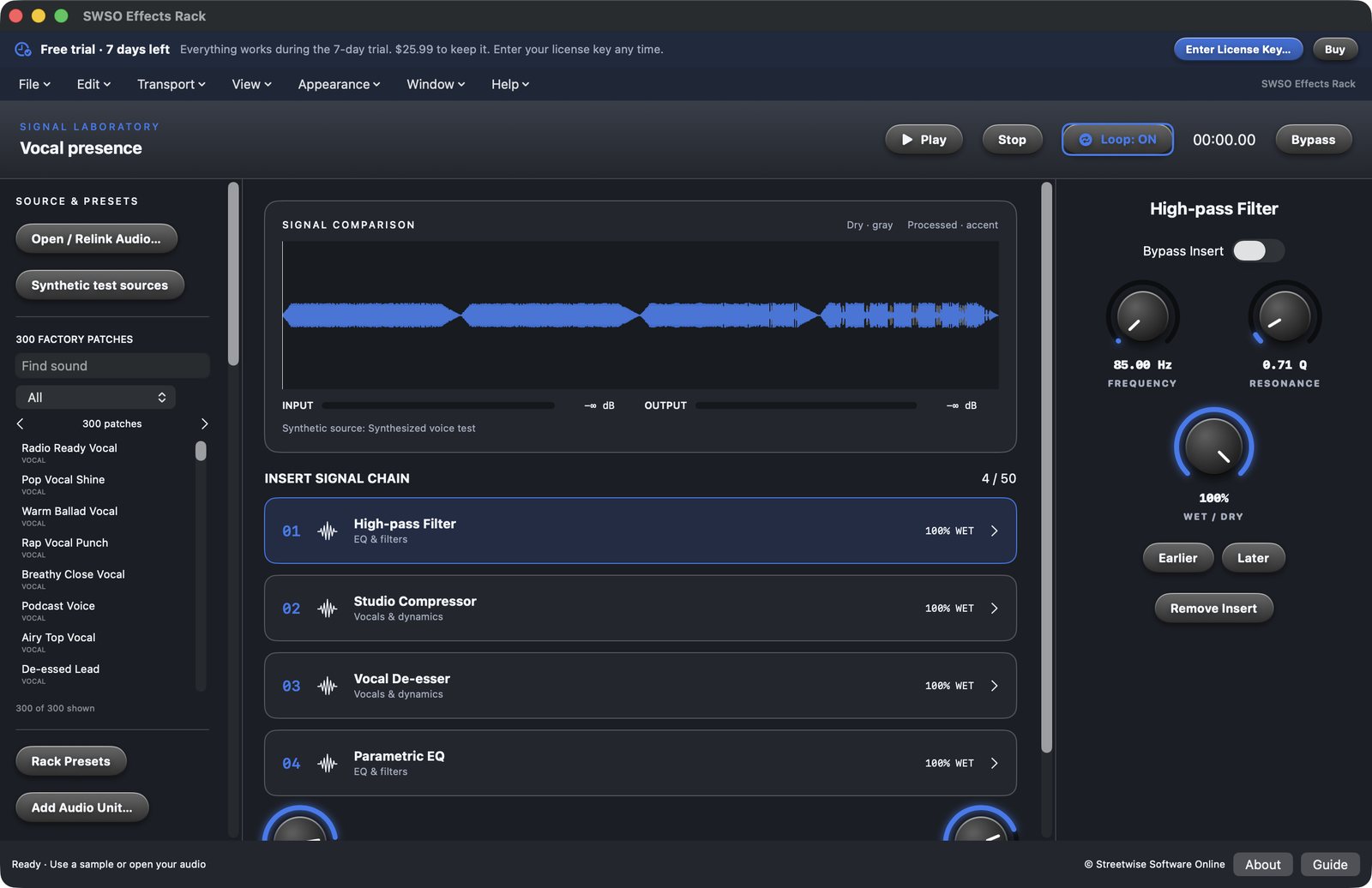
SWSO Effects Rack with the 300 factory patches list, the dry and processed waveform comparison, a four-insert vocal chain and the Loop button turned on
300 racks12 families, each ending with a safety limiter
26 effectsEQ, filters, dynamics, colour, echo and modulation
Looplights up when on, remembered, Command-L

What you get

300 factory racks

  • 12 families: Vocal, Drums, Bass, Guitar, Keys & Synth, Mix Bus & Master, Delay & Echo, Modulation, Lo-Fi & Character, Space & Ambience, Filter & Movement, Creative & FX
  • Each rack is a different chain of processors
  • Every rack ends with a safety limiter so no preset can clip
  • Scrolling list with search, a family picker and ‹ › step buttons

Build your own chain

  • 26 built-in processors, including parametric EQ, shelves and filters, compressor, limiter, gate, de-esser, transient shaper, saturation, bit crusher, delays, chorus, flanger, phaser, tremolo, auto pan and room reverb
  • Inserts run top to bottom: reorder with Earlier and Later, bypass or remove
  • Wet/Dry blend on each insert
  • Up to 50 inserts, including AUv2 Audio Unit effects you choose to load

Listen, compare, export

  • Dry and processed waveforms side by side, with input and output meters
  • Bypass the whole rack to compare with the original
  • Loop repeats the source and keeps effect tails; Command-L for Loop, Command-period to Stop
  • Export Processed WAV: 24-bit stereo with effect tails and a clipping report

How it works

Try a built-in synthetic test source first, or open a short audio file of your own.

  1. Open your audioChoose File → Open / Relink Audio, or click Synthetic test sources.
  2. Pick a rackChoose one of the 300 racks, press Play, change one insert and compare with Bypass.
  3. Save and exportSave the project or a user preset, then Export Processed WAV and listen in another player.

Who it’s for

For anyone who wants their recordings to sound finished without a big studio program.

A young woman singing into a studio microphone with headphones on, a laptop on the desk in a bright room

Singers

Start from a vocal rack such as Radio Ready Vocal or Warm Ballad Vocal and fine-tune it.

A smiling woman wearing headphones listening at a laptop at a bright desk

Podcasters

Try Podcast Voice or Spoken Word on your recording, then export a clean WAV.

A woman at her kitchen table listening back to a recording on headphones

Home producers

Run drums, bass and mix-bus racks on your own tracks before you mix.

Try it free for 7 days

  • Every feature works for 7 days from the first launch, no key and no sign-up needed
  • After the trial the app becomes read-only: you can still open, play and export; editing and saving ask for a license key
  • Your key arrives by email after you buy. Enter it with SWSO Effects Rack → Enter License Key…
  • One-time purchase, no subscription

Specifications

System
macOS 15 Sequoia or later. Universal: runs natively on Intel and Apple silicon Macs
Version
0.2.0
Download
4.9 MB disk image (.dmg), Developer ID signed and notarized by Apple
Racks
300 factory racks in 12 families, plus your own user presets
Effects
26 built-in processors, up to 50 inserts, optional AUv2 Audio Unit effects
Audio in
Decoded to stereo 48 kHz; sources up to 10 minutes / 512 MB
Export
24-bit stereo WAV with effect tails and a clipping report
Look
6 SWSO themes, whole-interface zoom
License
One-time purchase, $25.99. 7-day free trial. Key entered with SWSO Effects Rack → Enter License Key…
Questions

Is it a plug-in for my music program?

  • No. It is a standalone Mac app, not an AU or VST plug-in. It can load AUv2 Audio Unit effects you choose; AUv3 and VST are not supported.

Is my original file changed?

  • No. The original stays as it is. Playback and the exported WAV are processed copies.

Does a project keep my audio?

  • A project saves the settings and a link to your audio file. Keep the audio next to the project, or use Open / Relink Audio if it moves.

Price

SWSO Effects Rack by Streetwise Software Online

Download the free trial now. One-time purchase, no subscription.

$25.99 one-time

See all SWSO software

Having a problem? Tell us and we’ll fix it.

Every Mac is a little different, and we fix issues as they come in. If something doesn’t work the way it should, use our contact form and tell us the app, its version, your Mac and macOS version, and what happened. Your report helps us fix it fast, for you and for everyone who uses our software.

Contact us

Product updates & bug reports

Found a bug or an issue? Report it to Streetwise Software Online with the app name, version and steps to reproduce it. We review reports and address confirmed bugs through product updates.

Read product updates and published fixes · Free trial and refund policy