SWSO File Bridge app icon

New · Mac-to-Mac file transfer

Send files to the Mac next door. Encrypted, approved, checked.

SWSO File Bridge by Streetwise Software Online · SWSO

Start receiving on one Mac, paste its pairing key on the other, and send. The receiver sees the exact list of files and chooses Accept or Decline. Every file is checked with a SHA-256 fingerprint before it is saved, and nothing goes through the cloud.

$25.99 one-time · 7-day free trial
Mac • macOS 15 or later • built for Intel Macs • 5.1 MB

macOSavailableWindowscomingMobilecoming soon
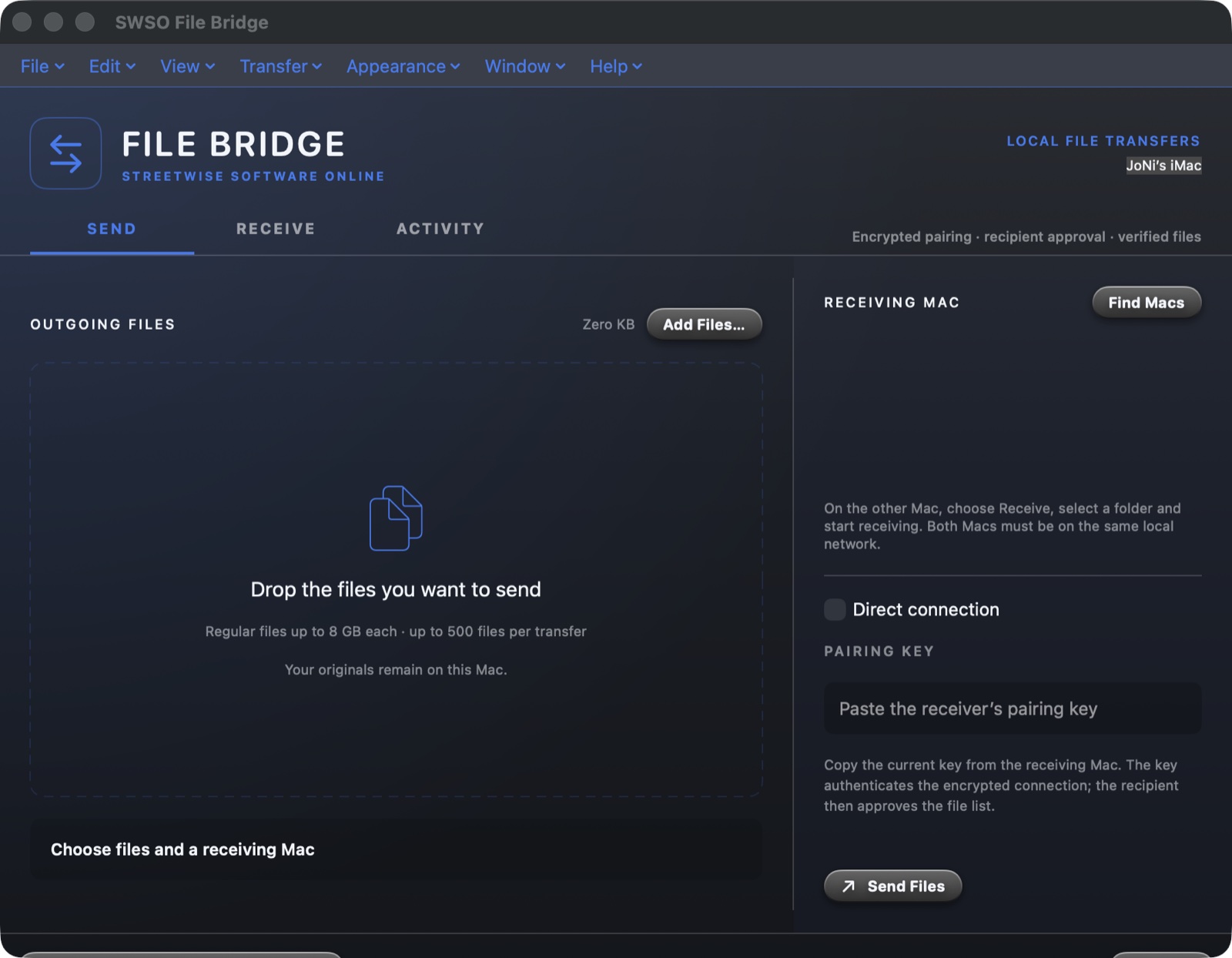
SWSO File Bridge on the Send tab: the outgoing files area, Find Macs, direct connection and the pairing key box
EncryptedTLS 1.2 PSK with AES-256-GCM
You approveAccept or Decline every batch
CheckedSHA-256 on every saved file

What you get

Pair and send

  • The receiver shows a fresh 43-character pairing key each session
  • Find Macs uses Bonjour on your local network
  • Direct connection by .local name or private address
  • Public internet addresses are refused

The receiver decides

  • Sees the exact file list and total size
  • Accept or Decline; a request expires after two minutes
  • Same-named files become numbered copies; nothing is replaced
  • Cancel cleans up the unfinished file

Safe saving

  • Each file is checked with SHA-256 before it is completed
  • Up to 500 files, 8 GB per file and 50 GB per batch
  • No relay, no cloud account
  • Source files stay where they are

How it works

You need two Macs on the same local network, both running File Bridge.

  1. ReceiveOn the receiving Mac choose Receive, pick a folder, click Start Receiving and copy the pairing key.
  2. SendOn the sending Mac add files, click Find Macs, choose the Mac and paste the key.
  3. AcceptThe receiver checks the list and clicks Accept Files.

Who it’s for

For moving files between Macs at home or in a small office.

Families

Move photos and documents from one Mac to another.

Small offices

Send files to the Mac across the room without a cloud service.

Privacy-minded users

Nothing passes through a relay or online account.

Try it free for 7 days

  • Every feature works for 7 days from the first launch, no key and no sign-up needed
  • After the trial, starting new transfers and adding to the queue need a license; session results stay readable
  • Your key arrives by email after you buy. Enter it with Help → Enter License Key…
  • One-time purchase, no subscription

Specifications

System
macOS 15 Sequoia or later. Built for Intel Macs; on Apple silicon Macs macOS runs it through Rosetta 2
Version
0.1.2
Download
4.9 MB disk image (.dmg), Developer ID signed and notarized by Apple
Network
Local network (Bonjour) or direct private address; macOS may ask for local-network access
Limits
500 files, 8 GB per file, 50 GB per batch
Look
6 SWSO themes (Cobalt Gunmetal, Candy Red Titanium, Rose Gold, Lavender Pearl, Midnight Black, Brushed Gray), interface zoom 85% to 200%
License
One-time purchase, $25.99. 7-day free trial. Key entered with Help → Enter License Key…

Questions

Does it work over the internet?

  • No. It works between Macs on the same local network. Guest Wi-Fi and some company networks keep devices apart.

Can I send a whole folder?

  • Not in this version: it sends regular files. No folder trees, resume, Windows or phone app.

Are saved files encrypted?

  • The connection is encrypted. The saved files are ordinary files, so choose a suitable folder for private documents.

Price

SWSO File Bridge by Streetwise Software Online

Download the free trial now. One-time purchase, no subscription.

$25.99 one-time

See all SWSO software

Having a problem? Tell us and we’ll fix it.

Every Mac is a little different, and we fix issues as they come in. If something doesn’t work the way it should, use our contact form and tell us the app, its version, your Mac and macOS version, and what happened. Your report helps us fix it fast, for you and for everyone who uses our software.

Contact us

Product updates & bug reports

Found a bug or an issue? Report it to Streetwise Software Online with the app name, version and steps to reproduce it. We review reports and address confirmed bugs through product updates.

Read product updates and published fixes · Free trial and refund policy