SWSO MIDI Studio app icon

New · write & edit music as notes

Music as notes, not as sound.

SWSO MIDI Studio by Streetwise Software Online · SWSO

Open a MIDI file somebody sent you, change it, and save it back. Click on the piano roll to put a note down, click it again to take it away, and press Space to hear it played through the sounds your Mac already has. Tracks down the left, the notes in the middle, and a panel on the right that lines up, loosens, swings, transposes and tidies a whole part at once. Opens in the Score Teal theme, with 11 more to choose from.

$19.99 one-time purchase · 7-day free trial

Mac • macOS 14 or later • Intel and Apple silicon • 7-day free trial

macOSavailableWindowscomingMobilecoming soon
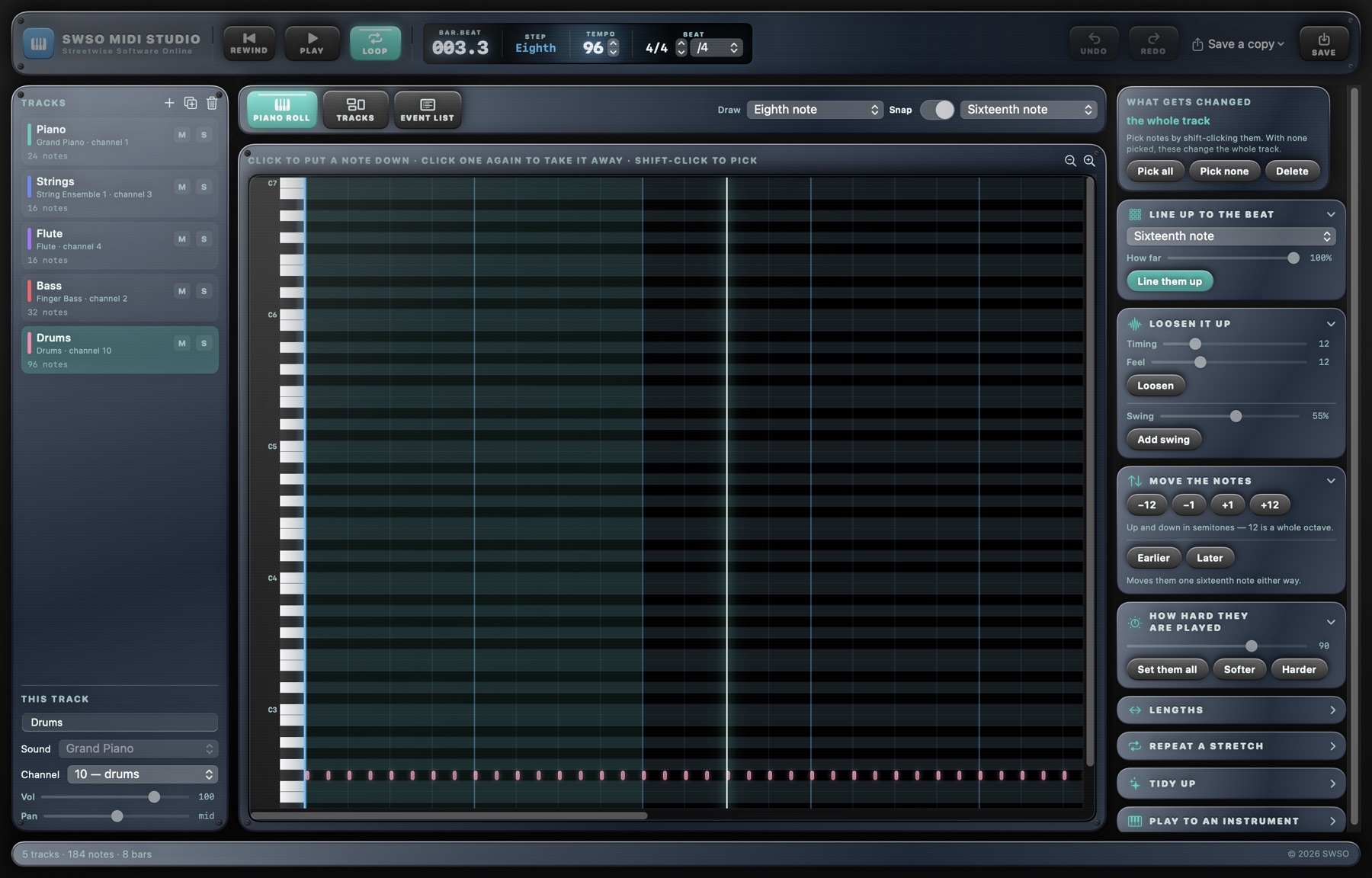
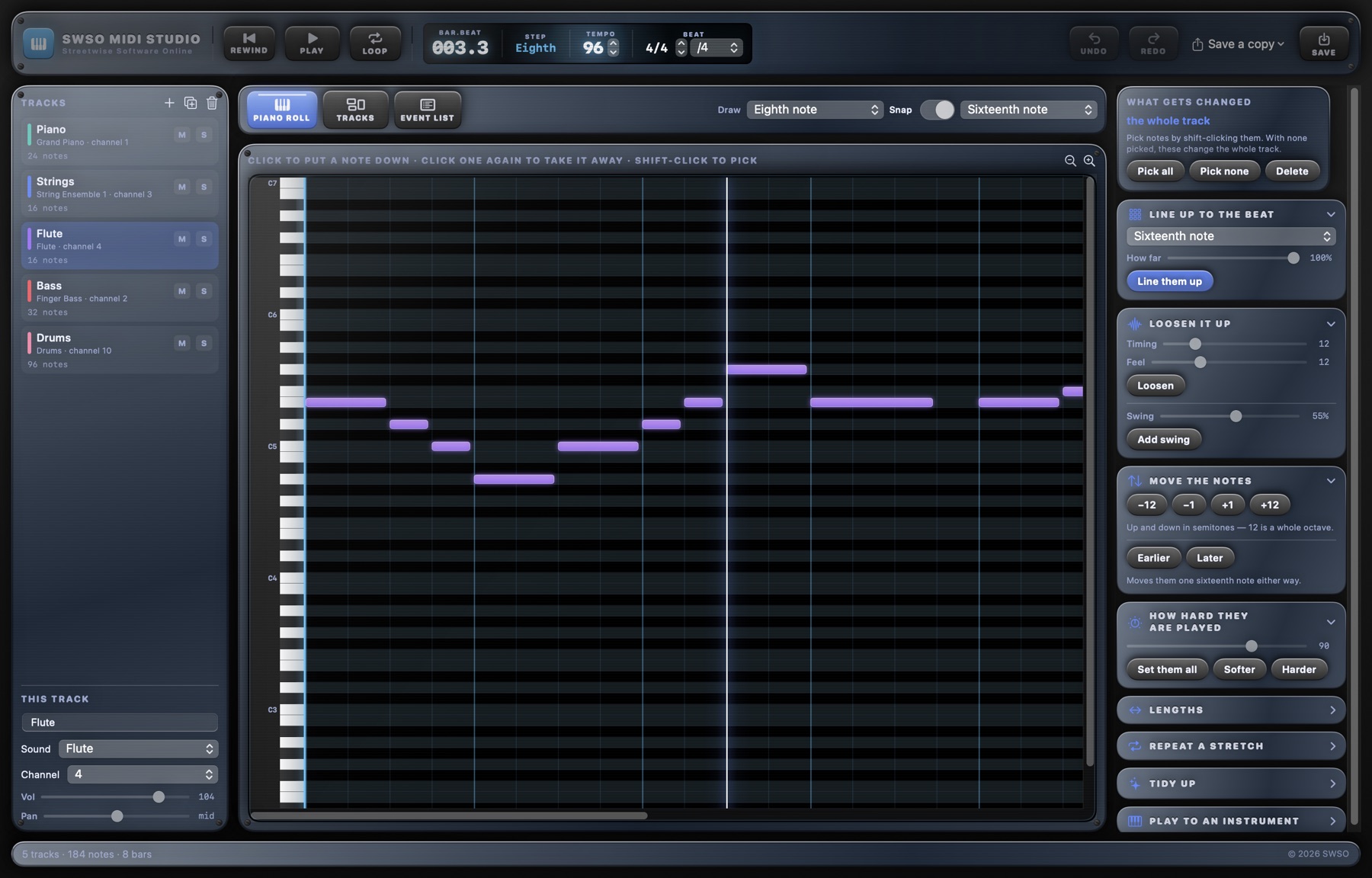
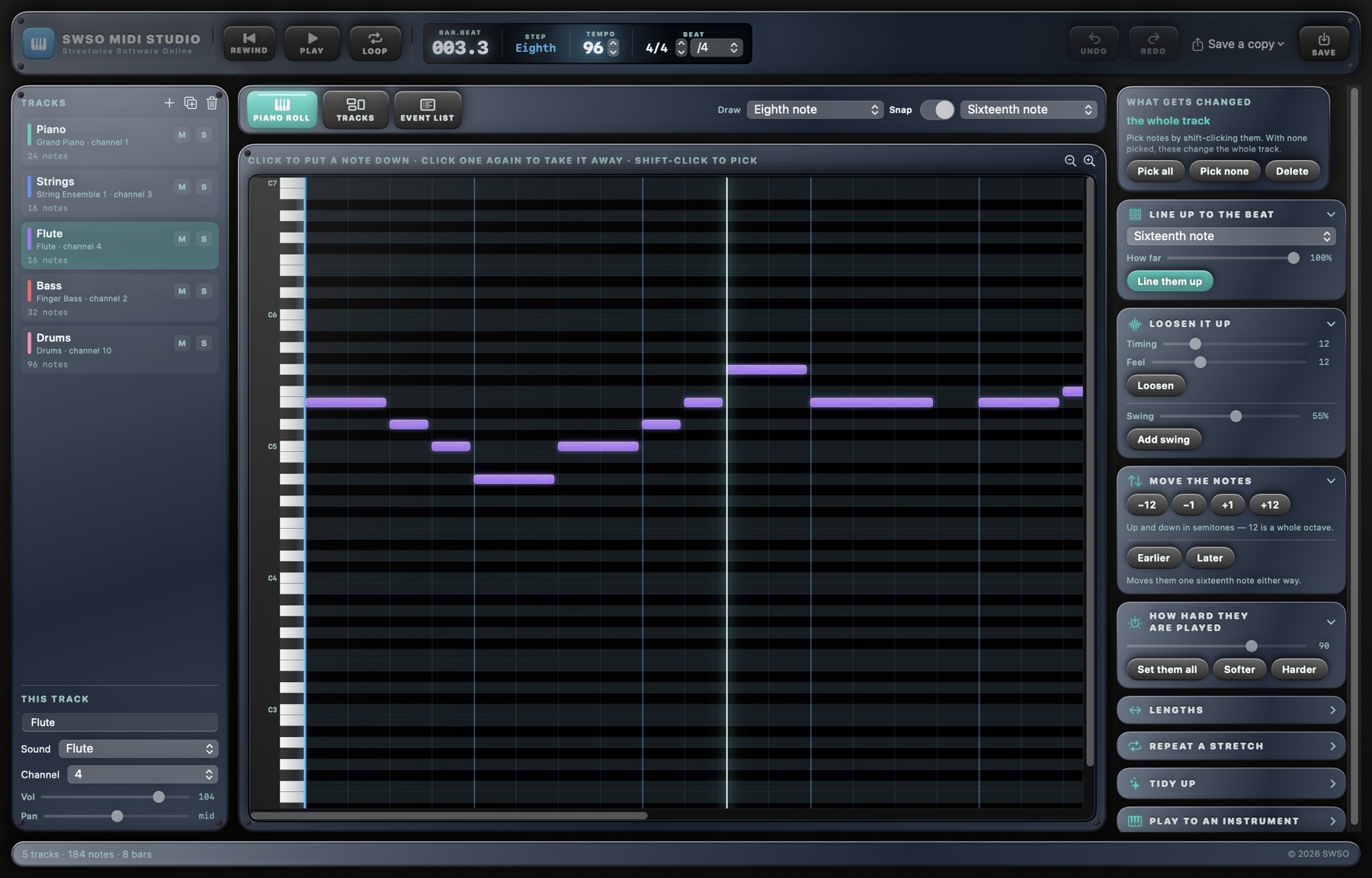
SWSO MIDI Studio: the track list on the left with Piano, Strings, Flute, Bass and Drums, the piano roll in the middle with notes laid out against the keyboard, and the note-editing panel down the right
Its own MIDI enginereads and writes Standard MIDI Files, format 0 and format 1 — a reader and a writer written from scratch against the published format, not borrowed
3 viewsPiano Roll for the notes, Tracks for the whole arrangement at once, Event List for every note as text with its bar.beat position
128 soundsthe full General MIDI set, one instrument per track, channel 10 for drums — played by the sounds macOS already has

Three ways to look at the same song

One window, and nothing to set up. Tracks down the left, the song in the middle, and the tools that change a lot of notes at once down the right. The three buttons above the song switch what the middle shows.

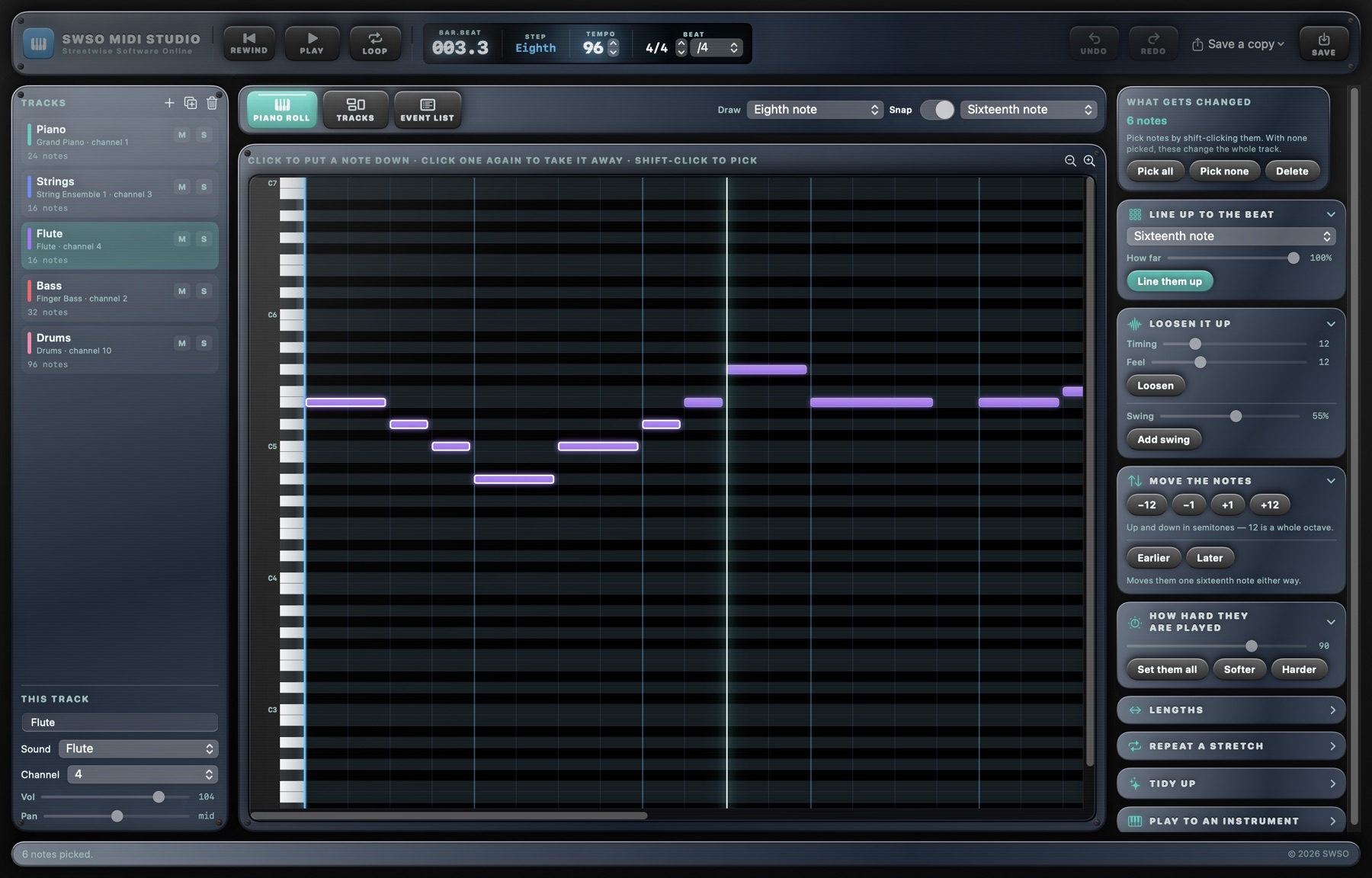
The piano roll view in SWSO MIDI Studio, with a keyboard down the left and the notes of the Flute track laid out across the bars

Piano Roll

Time runs left to right, pitch bottom to top. Click to put a note down, click it again to take it away, shift-click to pick notes for the tools. “Draw” sets how long a new note is and “Snap” lines it up to a division — or turn Snap off for free timing. Click a key down the left to hear that pitch.

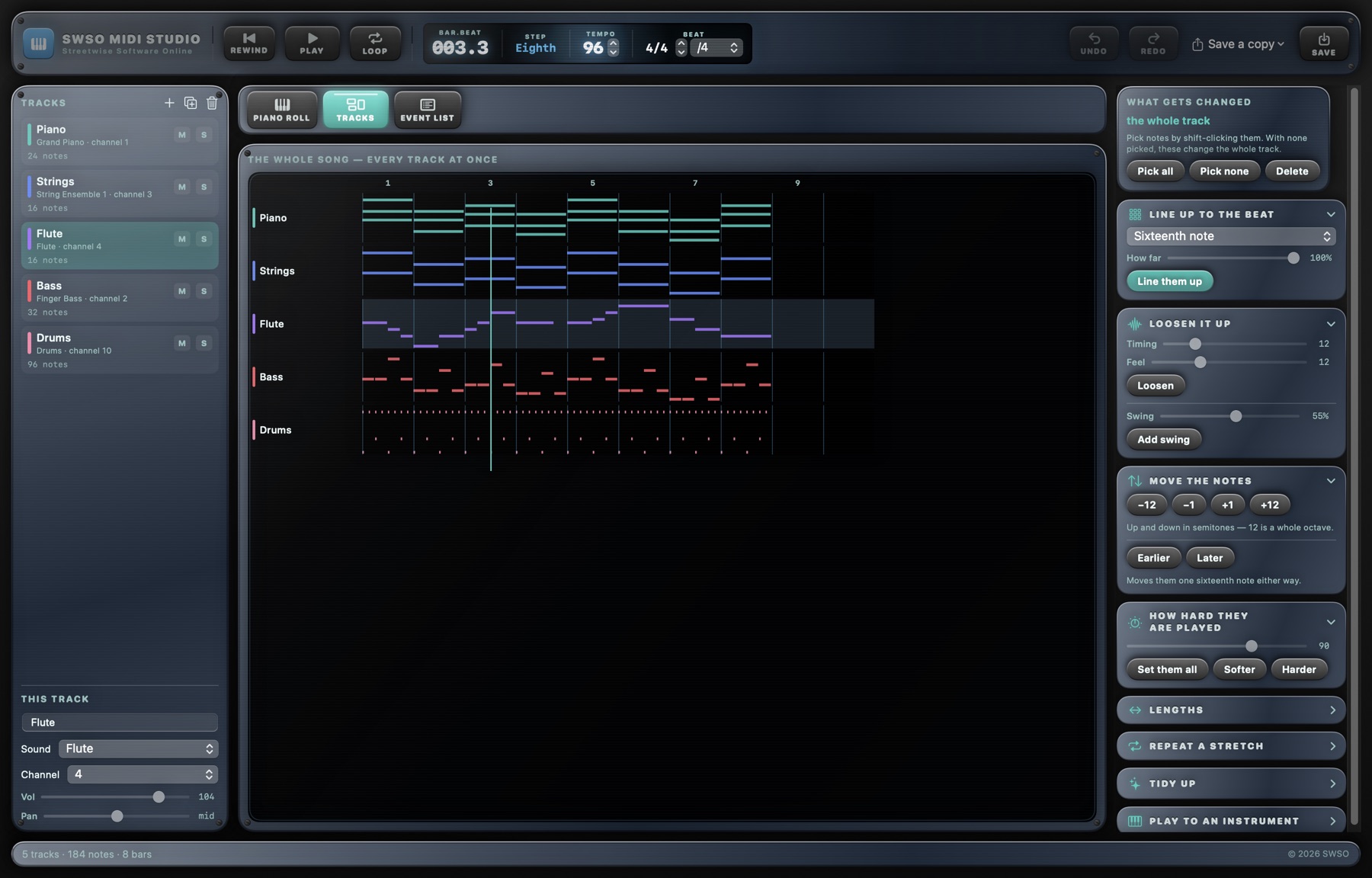
The Tracks view in SWSO MIDI Studio showing the whole song at once, one lane per track, each in its own colour

Tracks

The whole song at once, one lane per track, each track in its own colour. It is the quickest way to see the shape of an arrangement — where the strings come in, where the bass drops out, how long the drums run.

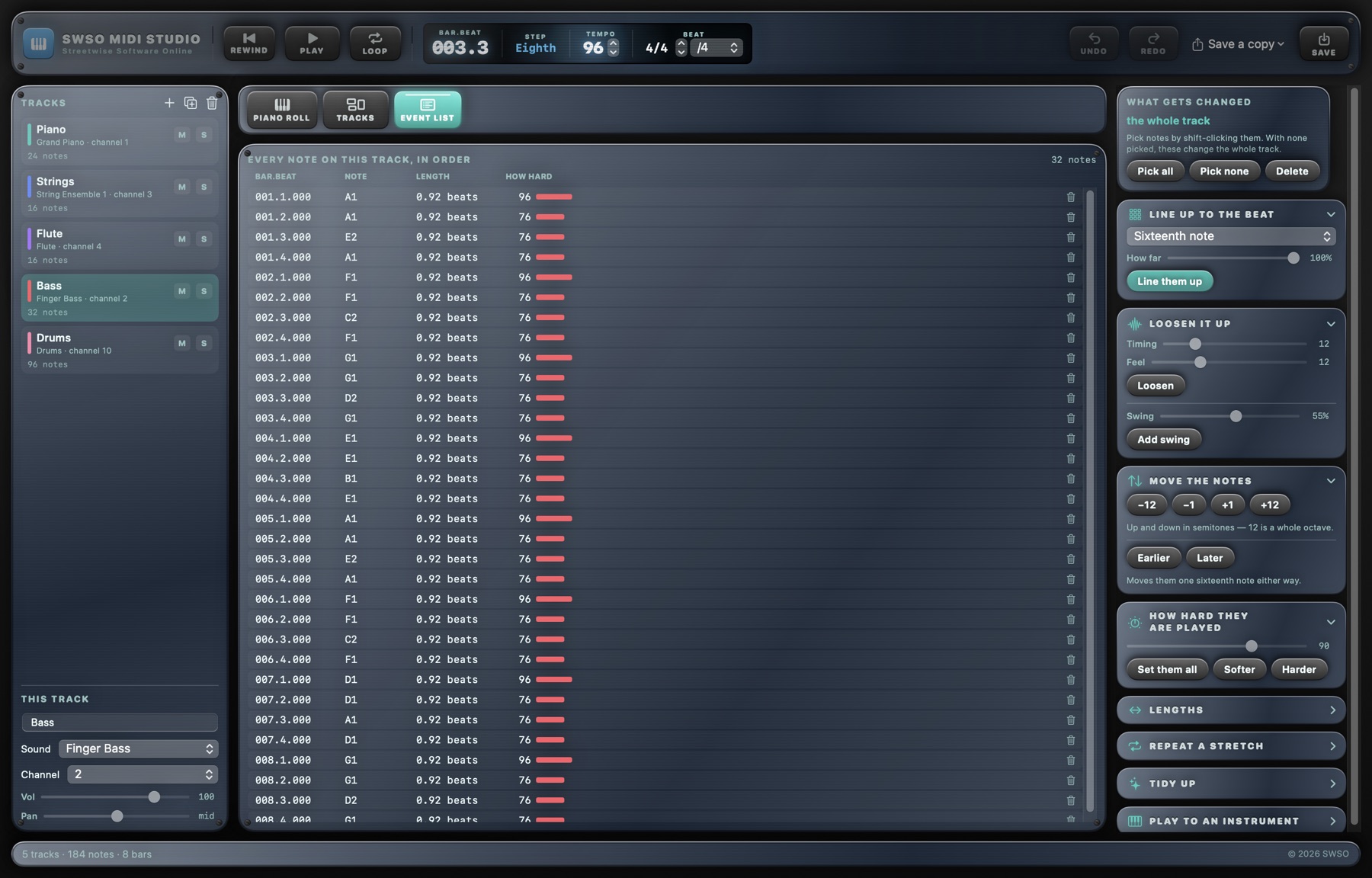
The Event List in SWSO MIDI Studio: every note on the track as a row with its bar.beat position, note name, length in beats and how hard it is played

Event List

Every note on the track as a row of plain text: where it starts as bar.beat, which note it is, how long it is in beats, and how hard it is played. When a part is almost right and you want to see the actual numbers, this is the view that shows them.

What you get

MIDI files, read and written properly

  • Opens any Standard MIDI File, format 0 or format 1, however many tracks it has — and the tempo, the time signature, the track names, the instruments, the volume, the pan and every note come in with it
  • Saves one back out that any other music program, and most keyboards, will open. Everything that came in survives the round trip
  • It understands running status, the compact form older files use, and scales a file written at another tick resolution so the timing stays right
  • A file timed to film frames rather than beats is refused with a plain explanation instead of being opened wrongly. That is rare outside film scoring
  • Double-click a .mid file in the Finder and it can open here

Tracks, sounds and drums

  • Each track is one instrument. The Sound menu is the full General MIDI set — 128 sounds, from Grand Piano to Gunshot
  • Channel 10 is the drum channel on every MIDI instrument ever made, so a track set to it plays drums instead of notes. The app sets that up for you
  • M mutes a track, S plays it on its own. Volume and Pan are per track and go into the MIDI file as well, so they survive being opened somewhere else
  • Each track keeps its own colour, on the piano roll and in the lanes view

Change a lot of notes at once

  • Line up to the beat — with a “how far” setting. 100% puts them dead on; 50% pulls them halfway, which tidies a part without ironing the life out of it
  • Loosen it up — shifts the timing and the feel a little, so a part that was typed in sounds played. Loosen the same song twice and it comes out the same, so you can undo and try again
  • Swing, move up and down in semitones, nudge earlier or later by one snap division
  • How hard they are played — set them all the same, or make the lot softer or harder. Lengths — shorter, longer, or joined up so each note runs into the next
  • Repeat a stretch of bars, take out notes stacked on top of each other, or keep only the top line of a chord part, which is how you pull the tune out of something
  • It works on the notes you picked — or on the whole track when you have picked none. The panel says which, so there is never any doubt. All of it can be undone

Playing it, and saving it

  • Space plays and stops, with the playhead running across the piano roll. Loop plays the same few bars over and over while you work on them
  • Everything plays through the sounds macOS already has, so there is nothing to install — and it can also send the same notes out to a MIDI keyboard or sound module plugged in
  • Save a .swmidi song (everything exactly as you left it, including what is picked), a Standard MIDI File, or real audio — WAV, AIFF or M4A
  • Audio is rendered properly rather than recorded off the speakers, so nothing else on the Mac can get into it and it comes out exactly as the song is
  • Signed and notarized by Apple, Intel and Apple silicon in one universal app. Nothing is uploaded and no account is needed

What is in the box

Grouped the way they are in the app’s own Help, in plain words rather than jargon.

The three viewsPiano Roll · Tracks (one lane per track) · Event List (bar.beat, note, length, how hard)
On the piano rollClick to add · click again to remove · shift-click to pick · Draw length · Snap · click the keyboard to hear a pitch · stretch or squeeze time
Per trackSound (128 General MIDI) · Channel (10 = drums) · Mute · Solo · Volume · Pan · its own colour
Timing toolsLine up to the beat (how far 0–100%) · Loosen it up (timing + feel) · Swing · Earlier / Later by one snap division
Note toolsMove up or down in semitones · Set or scale how hard · Shorter · Longer · Join up · Repeat a stretch of bars
Tidying upTake out notes stacked on top of each other · Keep only the top line of a chord part
PlayingSpace plays and stops · Loop · playhead · bar and beat counter · macOS’s own sounds · out to a plugged-in keyboard or module
FilesSaves .swmidi · reads and writes Standard MIDI Files (format 0 and 1) · saves audio as WAV, AIFF or M4A
Song settingsTempo · time signature · track names · instruments · volume · pan — all of it written into the MIDI file
Interface12 themes (opens in Score Teal) · Liquid Glass or SWSO Chrome · zoom with ⌘+, ⌘− and ⌘0

How it works

The app’s own Help gets you writing in four steps. These are the three that matter.

  1. Put the notes downThe app opens on a short piece with a piano, a bass and a drum part — or open a MIDI file somebody sent you. Click on the piano roll to add a note, click it again to take it away. Press Space to hear it.
  2. Fix a whole part at onceShift-click the notes you want, or pick none and work on the whole track. Line them up to the beat, loosen the timing, add swing, move them up an octave, make them longer. Everything can be undone.
  3. Save it the way you need it⌘S keeps the song as a .swmidi file. “Save a copy” writes a Standard MIDI File any music program can open, or a WAV, AIFF or M4A anyone can play.

Who it’s for

Anyone who works with MIDI files and wants to change them without opening a whole studio first.

A young woman at an upright piano with a laptop on top, working out a melody

Writing a part

Put the notes down one at a time with a mouse, hear them through the Mac’s own sounds, and build up a piano, a bass line and a drum part on their own tracks. No keyboard needed, and nothing to install.

A man in glasses at a tidy desk with a small MIDI keyboard, leaning close to the screen

Fixing a MIDI file

Someone sends you a MIDI file and the timing is loose, it is in the wrong key, or the drums are on the wrong channel. Open it, line it up, move it up three semitones, set the channel to 10, and save it straight back out.

A music leader standing with printed parts in a hall, laptop open on the desk

Getting an arrangement out

See the whole arrangement as lanes, pull the tune out of a chord part with “keep only the top line”, repeat a stretch of bars, and then save the result as a MIDI file for the band — or as a WAV or an M4A for anyone else.

Try it free for 7 days

  • Every feature works for 7 days from the first launch, no key and no sign-up needed
  • After the trial you keep your files; add a license key to carry on. One-time purchase — no subscription
  • Family Edition: one Family key unlocks the app and every add-on, plug-in and extra pack — no second keys
  • Privacy: everything happens on your Mac. Nothing is uploaded and nothing about you is collected

System requirements

Mac
macOS 14 Sonoma or later, Intel and Apple silicon (universal). Mac only — there is no Windows version
MIDI files
Reads and writes Standard MIDI Files, format 0 and format 1 · its own reader and writer, written from scratch against the published format · understands running status · scales other tick resolutions correctly · a file timed to film frames is refused with a plain explanation
What survives
Tempo, time signature, track names, instruments, volume, pan and every note — in and back out again
Views
Piano Roll · Tracks (one lane per track) · Event List (bar.beat, note, length, how hard it is played)
Piano roll
Click to put a note down · click again to take it away · shift-click to pick · draw at any note length · snap to a division · click the keyboard to hear a pitch · stretch time out or squeeze it up
Tracks
One instrument each · the full General MIDI set of 128 sounds · channel 10 for drums · mute · solo · volume · pan
Editing a lot at once
On the notes picked, or on the whole track: line up to the beat with an adjustable strength · loosen the timing and the feel · swing · transpose in semitones · nudge earlier or later · set or scale how hard notes are played · shorter, longer or joined up · repeat a stretch of bars · take out notes stacked on top of each other · keep only the top line of a chord part
Playing
Through the sounds macOS already has — nothing to install · loop · playhead · bar and beat counter · can also send the notes out to a MIDI keyboard or sound module plugged in
Saves
.swmidi, keeping the song exactly as you left it · opens by double-click in the Finder
Exports
Standard MIDI File · audio as WAV, AIFF or M4A, rendered properly rather than recorded off the speakers
Interface
12 coloured themes (opens in Score Teal) · Liquid Glass or SWSO Chrome look · interface zoom with ⌘+, ⌘− and ⌘0
Your data
Everything happens on your Mac. No accounts, no subscription, nothing uploaded
Signed
Signed and notarized by Apple
Questions

Is there a Windows version?

  • No. SWSO MIDI Studio is a Mac app: macOS 14 Sonoma or later, Intel and Apple silicon in one universal app, signed and notarized by Apple. There is no Windows version.

Can I record from my MIDI keyboard?

  • Not in version 1.0. The notes go out: if you have a keyboard or a sound module plugged in, “Play to an instrument” sends the song out to it while the Mac’s own sounds keep playing alongside. Recording what you play in is not in this version — the notes are put down with the mouse, on the piano roll.

Does it print sheet music, or record audio?

  • No to both. This is a note editor, not a notation program and not a recorder. There is no sheet-music view and nothing to print; there is no audio recording and no mixer with effects. What it does write is a Standard MIDI File, and a WAV, AIFF or M4A rendered from the song.

Can a song change tempo part-way through?

  • Not in version 1.0 — a song has one tempo and one time signature, set along the top. There are also no key signatures, no lyrics and no plug-ins (AU or VST). What is here is the notes, the tracks, the tools that change a lot of notes at once, and honest MIDI files in and out.

Price

SWSO MIDI Studio by Streetwise Software Online

Download the free trial now. One-time purchase, no subscription.

$19.99 one-time

See all SWSO software

Having a problem? Tell us and we’ll fix it.

Every computer is a little different: the macOS or Windows version, the hardware and how it’s set up can all change how an app behaves. We understand that, and we fix issues as they come in. If something doesn’t work the way it should, please don’t stay silent. Use our contact form and tell us the app, its version, your computer and system version, and what happened. Your report helps us fix it fast, for you and for everyone who uses our software.

Contact us

Product updates & bug reports

Found a bug or an issue? Report it to Streetwise Software Online with the app name, version and steps to reproduce it. We review reports and address confirmed bugs through product updates.

Read product updates and published fixes · Free trial and refund policy