SWSO Mix Performance app icon

New · two-deck stem performance for your Mac

Two decks. Four stems each. One performance.

SWSO Mix Performance by Streetwise Software Online · SWSO

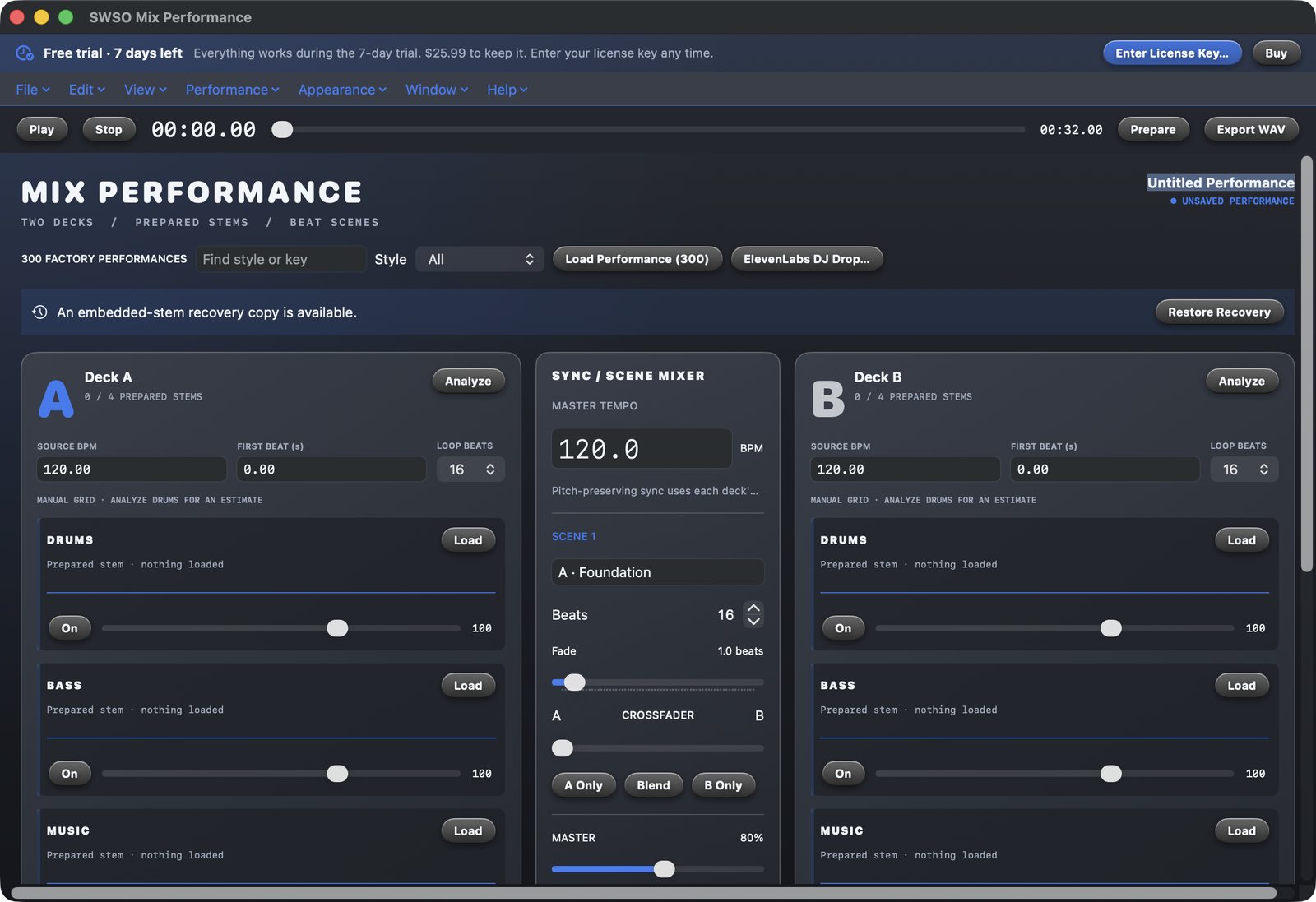
Load a factory performance, or your own already separated stems, into Deck A and Deck B: drums, bass, music and vocal. Set the tempo, build scenes that switch parts on and off, blend the decks with the crossfader and export the whole performance as a 24-bit WAV.

$25.99 one-time · 7-day free trial

Mac • macOS 15 or later • Intel and Apple silicon • 9.3 MB

macOSavailableWindowscomingMobilecoming soon
SWSO Mix Performance with 300 factory performances, Deck A and Deck B with Drums, Bass and Music lanes, and the sync and scene mixer with the A/B crossfader
300 performances15 styles × 20, each with its own tempo and key
2 × 4 stemsDrums, Bass, Music and Vocal on each deck
32 sceneswith fades of 0–16 beats

What you get

300 factory performances

  • 15 styles: Downtempo, Deep House, Tech House, Techno, Trance, Drum and Bass, Breakbeat, Hip-Hop, Trap, Disco, Funk, Synthwave, Dub & Reggae, Ambient, Pop Dance
  • Each has its own drum pattern, tempo, key, chords, bass line and instrument colours on both decks
  • Deck B is in the matching relative key
  • Load Performance menu grouped by style, showing tempo and key

Two decks of stems

  • Drums, Bass, Music and Vocal lanes on Deck A and Deck B
  • Load your own already separated stems: WAV, AIFF, CAF and other audio macOS can decode
  • Source BPM, first-beat offset and loop length for each deck; Analyze gives a tempo estimate
  • Pitch-preserving sync to one master tempo (60–200 BPM)

Scenes and export

  • Each scene has its own On/Muted switch and 0–150% level for every stem
  • Equal-power A/B crossfader and timed fades between scenes
  • Cue keys 1–8 jump to scene starts during playback
  • Export WAV: stereo 48 kHz, 24-bit; .swperformance projects keep the audio inside

How it works

Start with one of the 300 factory performances, or choose File → Load Original Example.

  1. Load a performancePick one by style and key, press Prepare, then Play.
  2. Build scenesFor each scene, switch stems on and off, set their levels and move the crossfader.
  3. ExportSave a .swperformance project and Export WAV, then listen through each scene change.

Who it’s for

For anyone who wants to plan a two-deck mix from stems and keep it as one file.

A teenage girl on her bedroom floor at night, headphones on, working out a mix on a laptop

Learning to mix

Start from a factory performance and hear what each stem and the crossfader do.

A young man DJing in a small community hall, one hand on his headphones, people dancing behind him

Party sets

Plan scenes that move from Deck A to Deck B and export the set as one WAV.

A man in glasses at a tidy desk with a small MIDI keyboard, leaning close to the screen

Producers with stems

Load stems you already have and try them against a second deck at one tempo.

Try it free for 7 days

  • Every feature works for 7 days from the first launch, no key and no sign-up needed
  • After the trial the app becomes read-only: you can still open, play and export; editing and saving ask for a license key
  • Your key arrives by email after you buy. Enter it with SWSO Mix Performance → Enter License Key…
  • One-time purchase, no subscription

Specifications

System
macOS 15 Sequoia or later. Universal: runs natively on Intel and Apple silicon Macs
Version
0.2.0
Download
9.3 MB disk image (.dmg), Developer ID signed and notarized by Apple
Performances
300 factory performances in 15 styles
Stems
Drums, Bass, Music and Vocal on each deck; up to two minutes and 200 MB per stem file
Arrangement
Up to 32 scenes and three minutes; 4–64 loop beats; 60–200 BPM
Export
24-bit stereo WAV at 48 kHz
Optional
ElevenLabs DJ drops use your own ElevenLabs key and credits
Look
6 SWSO themes, interface zoom 85% to 200%
License
One-time purchase, $25.99. 7-day free trial. Key entered with SWSO Mix Performance → Enter License Key…

Questions

Does it split a song into stems?

  • No. It mixes stems that are already separated. Importing a full mixed song does not separate its instruments.

Is my music uploaded?

  • No. Stem mixing happens on your Mac. Only the optional ElevenLabs DJ drop sends its script text to ElevenLabs, with your own key and credits.

Is it a live DJ app?

  • It prepares the mix and then plays it. Cue keys jump to scene starts during playback, but they do not record a new live arrangement.

Price

SWSO Mix Performance by Streetwise Software Online

Download the free trial now. One-time purchase, no subscription.

$25.99 one-time

See all SWSO software

Having a problem? Tell us and we’ll fix it.

Every Mac is a little different, and we fix issues as they come in. If something doesn’t work the way it should, use our contact form and tell us the app, its version, your Mac and macOS version, and what happened. Your report helps us fix it fast, for you and for everyone who uses our software.

Contact us

Product updates & bug reports

Found a bug or an issue? Report it to Streetwise Software Online with the app name, version and steps to reproduce it. We review reports and address confirmed bugs through product updates.

Read product updates and published fixes · Free trial and refund policy