SWSO Pattern Studio app icon

New · pattern sequencer for your Mac

Pick a groove. Build the song around it.

SWSO Pattern Studio by Streetwise Software Online · SWSO

Start from one of 300 ready-to-play four-bar beats in 20 genres, or from a blank song. Draw notes in the piano roll, click drum steps, arrange clips on tracks and loop any section while you work. Export the result as a 24-bit WAV or a MIDI file.

$25.99 one-time · 7-day free trial

Mac • macOS 15 or later • Intel and Apple silicon • 3.0 MB

macOSavailableWindowscomingMobilecoming soon
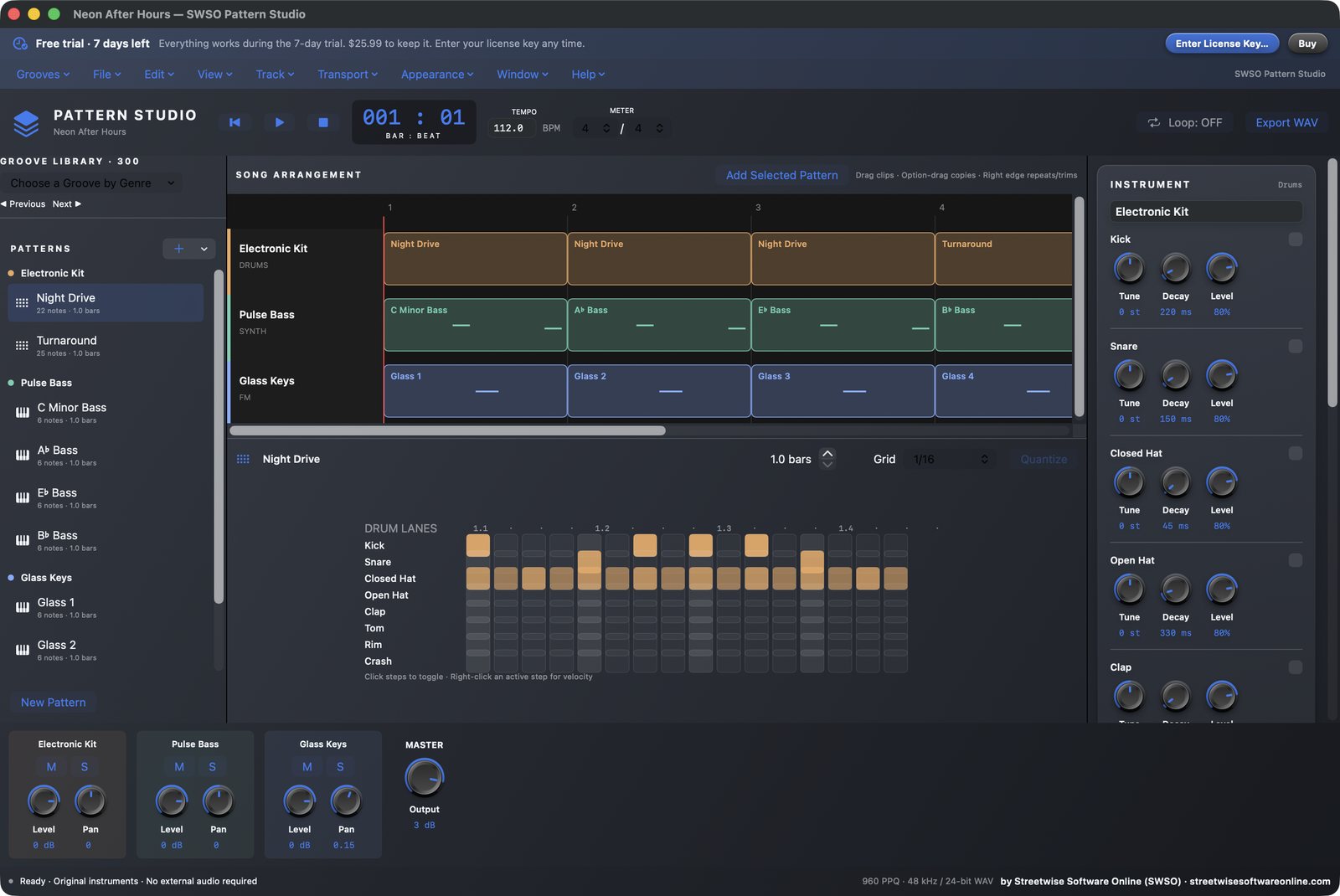
SWSO Pattern Studio with the Groove Library, the song arrangement of drum, bass and keys clips, the drum step grid and the instrument panel
300 grooves20 genres × 15 four-bar beats
600 sounds300 Synth Studio + 300 FM Synth sounds for instrument tracks
WAV + MIDI24-bit 48 kHz WAV and MIDI format 1 export

What you get

Groove Library

  • 20 genres: House, Deep House, Techno, Trance, Drum & Bass, Dubstep, Breakbeat, Electro, UK Garage, Hip-Hop, Trap, Lo-fi, R&B, Funk, Disco, Rock, Pop, Reggae, Latin, Synthwave
  • Each groove has its own drum pattern, kit tuning, bass line, chords, tempo, swing and key
  • Grooves menu by genre, or Previous / Next in the side panel
  • Includes the original example song Neon After Hours

Write and arrange

  • Piano roll: draw, move, resize and nudge notes, set velocity, quantize
  • Eight-lane synthesized drum kit: click steps, right-click for velocity, tune, decay and level per lane
  • Synth, FM and Drum tracks with reusable patterns; drag, copy and repeat clips
  • Mixer with level, pan, mute and solo per track, plus master output and limiter

Loop and export

  • Bar-aligned loop that repeats seamlessly: echo and note tails ring into the next pass
  • Start and End bar can’t cross, and Command-L turns Loop on and off
  • Export WAV: stereo 48 kHz, 24-bit, with a three-second tail
  • Export MIDI format 1 at 960 PPQ; import note-only MIDI files

How it works

Open a groove from the Grooves menu, or choose File → Open Original Example.

  1. Pick a grooveChoose one of the 300 grooves by genre and press Play.
  2. Make it yoursChange notes in the piano roll, toggle drum steps and pick other sounds for the synth and FM tracks.
  3. Loop and exportLoop a section while you work, save your .swpattern song, then Export WAV.

Who it’s for

For anyone who wants a beat going in minutes and a song built from it.

A teenage boy at a cluttered bedroom desk tapping out a drum pattern on a laptop

Starting out

Begin with a finished four-bar beat and change it one step at a time.

Two friends leaning over a laptop in a rehearsal room, one holding a guitar

Songwriters and bands

Sketch a groove and a bass line to try your ideas against.

A smiling young woman with headphones working at a laptop between two speakers in a bright apartment

Producers

Export the arrangement as a WAV, or as MIDI for another program.

Try it free for 7 days

  • Every feature works for 7 days from the first launch, no key and no sign-up needed
  • After the trial the app becomes read-only: you can still open, play and export; editing and saving ask for a license key
  • Your key arrives by email after you buy. Enter it with SWSO Pattern Studio → Enter License Key…
  • One-time purchase, no subscription

Specifications

System
macOS 15 Sequoia or later. Universal: runs natively on Intel and Apple silicon Macs
Version
0.2.0
Download
3.0 MB disk image (.dmg), Developer ID signed and notarized by Apple
Grooves
300 four-bar grooves in 20 genres
Tracks
Synth, FM and 8-lane Drum tracks; up to 16 tracks and 256 patterns, patterns 1–64 bars
Export
WAV, stereo 48 kHz 24-bit; MIDI format 1 at 960 PPQ
Songs
.swpattern files with notes, clips, mixer settings and instrument sounds embedded
Look
6 SWSO themes, interface zoom 85% to 200%
License
One-time purchase, $25.99. 7-day free trial. Key entered with SWSO Pattern Studio → Enter License Key…
Questions

Can I record audio or use samples?

  • No. This version has no audio recording, sample import or plug-in hosting. All sounds come from its own built-in instruments.

Why does Play take a moment?

  • Pattern Studio prepares the song before it plays, with the same engine as WAV export. Editing stops playback; the next Play prepares the updated song.

Can I play it live from a MIDI keyboard?

  • No. It is a prepare-then-play sequencer: it does not do low-latency MIDI playing or recording.

Price

SWSO Pattern Studio by Streetwise Software Online

Download the free trial now. One-time purchase, no subscription.

$25.99 one-time

See all SWSO software

Having a problem? Tell us and we’ll fix it.

Every Mac is a little different, and we fix issues as they come in. If something doesn’t work the way it should, use our contact form and tell us the app, its version, your Mac and macOS version, and what happened. Your report helps us fix it fast, for you and for everyone who uses our software.

Contact us

Product updates & bug reports

Found a bug or an issue? Report it to Streetwise Software Online with the app name, version and steps to reproduce it. We review reports and address confirmed bugs through product updates.

Read product updates and published fixes · Free trial and refund policy