SWSO Photo Proof app icon

New · file details checker for your Mac

See what your files say about you. Then share a clean copy.

SWSO Photo Proof by Streetwise Software Online · SWSO

Drop in pictures, videos, PDFs or Office files and see the hidden details stored inside them, with plain-English findings at the top: a stored GPS location, editing software, personal details. Make a clean copy without them, compare two pictures, and save a report.

$15.00 one-time · 7-day free trial

Mac • macOS 14 or later • Intel and Apple silicon • 4.9 MB

macOSavailableWindowscomingMobilecoming soon
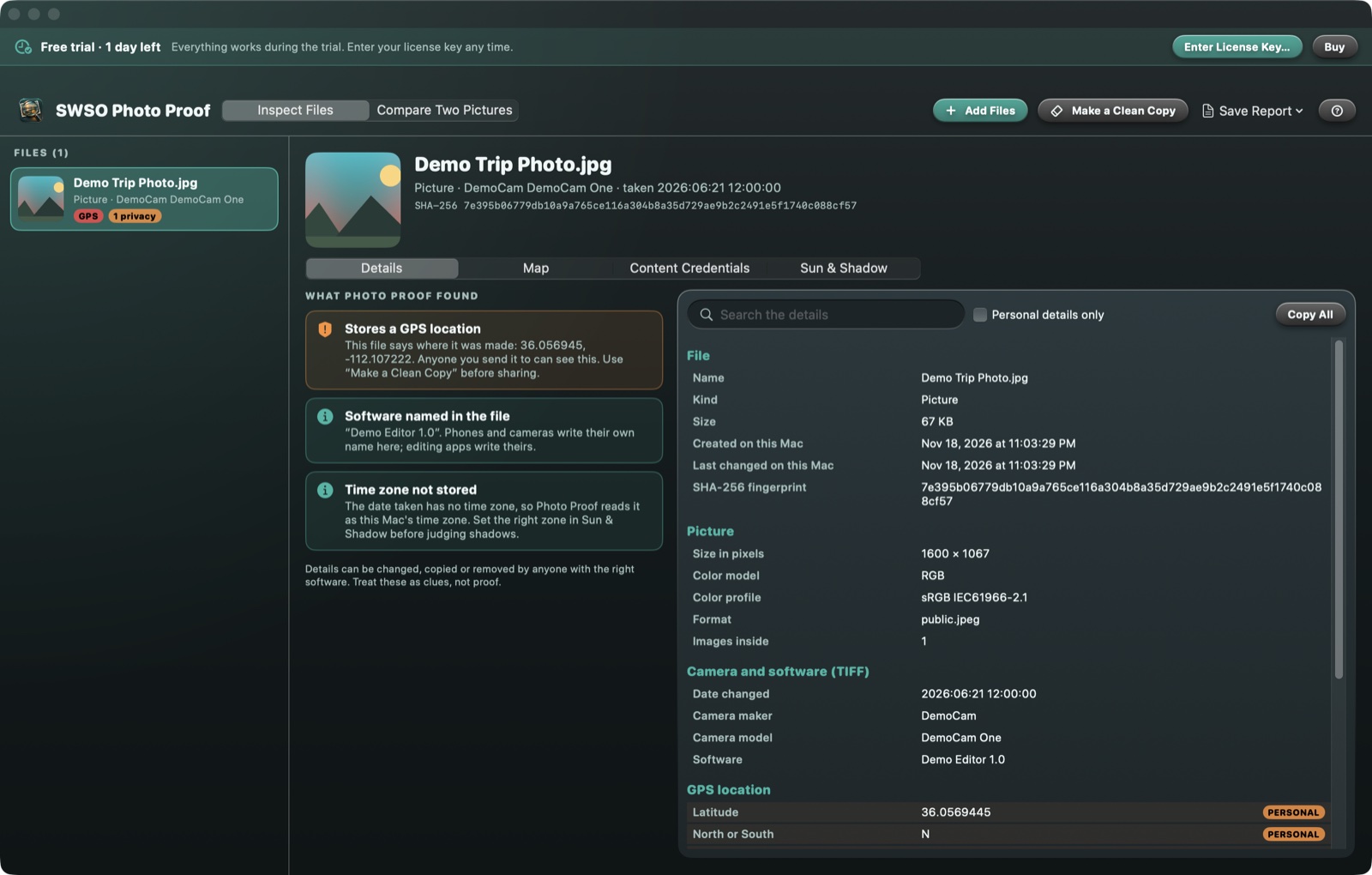
SWSO Photo Proof inspecting a demo photo: findings for a stored GPS location, software named in the file and no time zone, beside the full details list
Pictures, video, documentsJPEG, HEIC, PNG, RAW, MOV, MP4, PDF, Word, Excel, PowerPoint
Clean copiesa NEW file without location and personal details
ReportsPDF or CSV, with SHA-256 fingerprints

What you get

Details and findings

  • Camera and lens, dates and time zone, exposure, GPS location and direction
  • Caption, author and copyright (IPTC), Adobe XMP details and serial numbers
  • Office files: author, last saved by, company, comments and tracked changes
  • Plain-English findings at the top of every file

Check a picture

  • Map shows a stored GPS location (Apple Maps)
  • Content Credentials (C2PA) records are read and explained
  • Sun & Shadow shows where the sun was for a place and time
  • Compare Two Pictures marks every changed area in red

Share safely

  • Make a Clean Copy never changes your original
  • Pictures keep exactly the same pixels
  • Save Report as PDF or CSV
  • A SHA-256 fingerprint for every file

How it works

Drop files or a whole folder onto the window, or press Add Files.

  1. Add filesDrop pictures, videos or documents onto the window.
  2. Read the findingsDetails lists everything; Map, Content Credentials and Sun & Shadow add more.
  3. Clean or reportMake a Clean Copy, or Save Report as PDF or CSV.

Who it’s for

For anyone who shares files and wants to know what is inside them.

Everyday sharers

Remove the GPS location before you post or send a photo.

Office workers

See the author, company and tracked changes before a document goes out.

Careful readers

Use the details, Content Credentials and shadows as clues about a picture.

Try it free for 7 days

  • Every feature works for 7 days from the first launch, no key and no sign-up needed
  • After the trial, making clean copies needs a license; you can still open, view and export
  • Your key arrives by email after you buy. Enter it with SWSO Photo Proof → Enter License Key…
  • One-time purchase, no subscription

Specifications

System
macOS 14 Sonoma or later, Intel and Apple silicon (universal)
Version
1.0.1
Download
4.6 MB disk image (.dmg), Developer ID signed and notarized by Apple
Reads
JPEG, HEIC, PNG, TIFF, GIF, WebP, AVIF, camera RAW (DNG, CR2, CR3, NEF, ARW, ORF, RW2, RAF), MOV, MP4, M4V, PDF, .docx, .xlsx, .pptx
Clean copies
Pictures (JPEG, HEIC, PNG, TIFF), videos, PDFs, Word, Excel, PowerPoint
Reports
PDF and CSV
Internet
Only the Map tab, to fetch Apple Maps pictures
License
One-time purchase, $15.00. 7-day free trial. Key entered with SWSO Photo Proof → Enter License Key…
Questions

Does it prove where or when a photo was taken?

  • No. File details can be changed, copied or removed. Treat the findings as clues to check against other things, not as proof.

Does it check Content Credentials signatures?

  • Not in this version. It reads and explains the record but does not check its digital signature.

Are my files uploaded?

  • No. Your files stay on your Mac. Only the Map tab uses the internet, to fetch map pictures.

Price

SWSO Photo Proof by Streetwise Software Online

Download the free trial now. One-time purchase, no subscription.

$15.00 one-time

See all SWSO software

Having a problem? Tell us and we’ll fix it.

Every Mac is a little different, and we fix issues as they come in. If something doesn’t work the way it should, use our contact form and tell us the app, its version, your Mac and macOS version, and what happened. Your report helps us fix it fast, for you and for everyone who uses our software.

Contact us

Product updates & bug reports

Found a bug or an issue? Report it to Streetwise Software Online with the app name, version and steps to reproduce it. We review reports and address confirmed bugs through product updates.

Read product updates and published fixes · Free trial and refund policy