SWSO Synth Studio app icon

New · synthesizer for your Mac

300 sounds to start from. Every knob to make them yours.

SWSO Synth Studio by Streetwise Software Online · SWSO

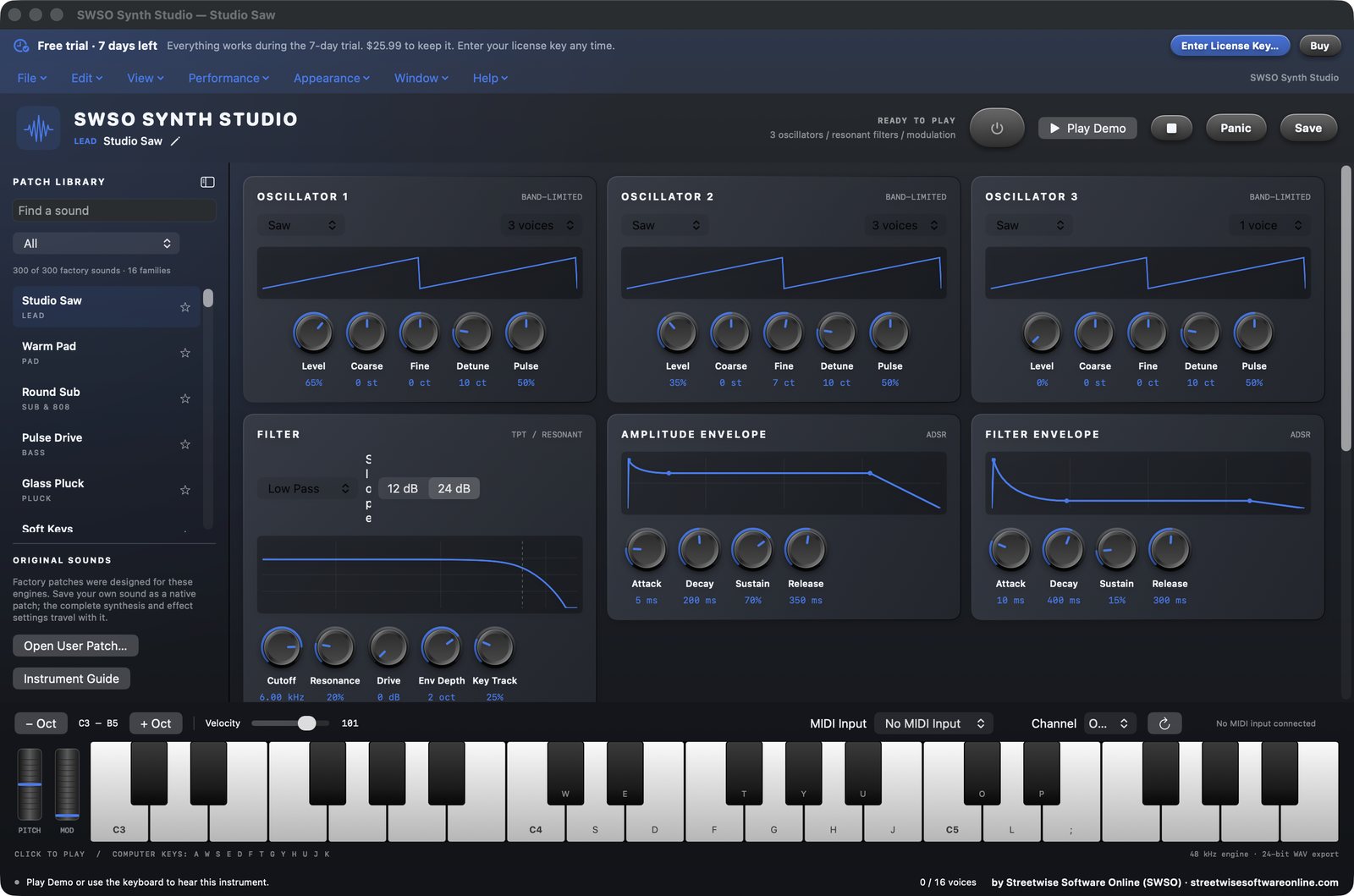
Pick a sound from the Patch Library and play it on the on-screen keyboard, your computer keys or a MIDI keyboard. Shape it with three oscillators, a resonant filter, two envelopes and two LFOs, save your own patches and render a 24-bit WAV of the demo phrase.

$25.99 one-time · 7-day free trial

Mac • macOS 15 or later • Intel and Apple silicon • 5.0 MB

macOSavailableWindowscomingMobilecoming soon
SWSO Synth Studio with the Patch Library (300 factory sounds, 16 families), three oscillators, the filter, two envelopes and the on-screen keyboard
300 soundsdesigned sounds in 16 families
3 oscillatorseach with 1–5 voice unison
24-bit WAVstereo 48 kHz demo render

What you get

300 sounds, easy to find

  • 16 families: Bass, Sub & 808, Lead, Pad, Strings, Brass, Keys, Organ, Pluck, Bell & Mallet, Arp & Sequence, Chord & Stab, Choir & Vox, Texture & Atmosphere, FX & Risers, Drums & Percussion
  • Every sound is its own design, named for what it does: Acid Squelch, Wobble Monster, Tremolo Strings, Laser Zap
  • Type in Find a sound, pick a family, or show only your Favorites (click the star)
  • The line under the list shows how many sounds are showing

Shape the sound

  • Three oscillators: sine, saw, pulse, triangle and noise, with level, coarse and fine tuning, unison and detune
  • Resonant filter: low-pass, high-pass, band-pass or notch at 12 or 24 dB, with drive and key tracking
  • Separate amplitude and filter envelopes (attack, decay, sustain, release)
  • Two LFOs, up to 16 modulation routes, mono, legato and glide

Play it and keep it

  • Three-octave on-screen keyboard, or the computer keys A W S E D F T G Y H U J K
  • MIDI keyboard input with velocity, sustain pedal, mod wheel and pitch bend
  • Stereo ping-pong delay, room reverb and a soft limiter
  • Save native patches; File → Render Demonstration WAV makes a 24-bit stereo WAV

How it works

No MIDI keyboard needed: the on-screen keyboard and your computer keys work straight away.

  1. Pick a soundChoose one of the 300 factory sounds, then press Play Demo or play the keyboard.
  2. Shape itChange an oscillator, lower the filter cutoff, adjust Attack and Release. Undo any step.
  3. Save and renderSave your patch under a new name, then choose File → Render Demonstration WAV.

Who it’s for

For anyone who wants to play and design synth sounds on a Mac.

A smiling young man in headphones playing a pad controller beside a laptop and a small keyboard in a bright room

Beginners

Start from a factory sound and change one knob at a time to hear what it does.

A young woman at an upright piano with a laptop on top, working out a melody

Keyboard players

Plug in a MIDI keyboard and play pads, keys, strings and leads with velocity and sustain.

A woman in a small home studio corner nodding along to a beat with one headphone off

Sound designers

Build your own basses, leads and textures and keep them as patches.

Try it free for 7 days

  • Every feature works for 7 days from the first launch, no key and no sign-up needed
  • After the trial the app becomes read-only: you can still open, play and export; editing and saving ask for a license key
  • Your key arrives by email after you buy. Enter it with SWSO Synth Studio → Enter License Key…
  • One-time purchase, no subscription

Specifications

System
macOS 15 Sequoia or later. Universal: runs natively on Intel and Apple silicon Macs
Version
0.2.0
Download
5.0 MB disk image (.dmg), Developer ID signed and notarized by Apple
Sounds
300 factory sounds in 16 families, with search, family picker and favorites
Engine
3 oscillators with unison, resonant filter (12/24 dB), 2 ADSR envelopes, 2 LFOs, up to 16 modulation routes, ping-pong delay, room reverb, soft limiter
MIDI
MIDI keyboard input (Omni or channel 1–16): notes, velocity, sustain, mod wheel, pitch bend, pressure
Export
24-bit stereo WAV at 48 kHz of the built-in demonstration phrase
Look
6 SWSO themes (Cobalt Gunmetal, Candy Red Titanium, Rose Gold, Lavender Pearl, Midnight Black, Brushed Gray), interface zoom 85% to 200%
License
One-time purchase, $25.99. 7-day free trial. Key entered with SWSO Synth Studio → Enter License Key…

Questions

Does it record what I play?

  • No. File → Render Demonstration WAV renders the built-in four-bar phrase with your sound. It is not a performance recorder or a MIDI-file player.

Is it a plug-in for my music program?

  • No. It is a standalone Mac app, not an Audio Unit, VST or CLAP plug-in.

Do I need a MIDI keyboard?

  • No. Click the on-screen keyboard or use your computer keys. A MIDI keyboard is optional.

Price

SWSO Synth Studio by Streetwise Software Online

Download the free trial now. One-time purchase, no subscription.

$25.99 one-time

See all SWSO software

Having a problem? Tell us and we’ll fix it.

Every Mac is a little different, and we fix issues as they come in. If something doesn’t work the way it should, use our contact form and tell us the app, its version, your Mac and macOS version, and what happened. Your report helps us fix it fast, for you and for everyone who uses our software.

Contact us

Product updates & bug reports

Found a bug or an issue? Report it to Streetwise Software Online with the app name, version and steps to reproduce it. We review reports and address confirmed bugs through product updates.

Read product updates and published fixes · Free trial and refund policy