SWSO Voice Workshop app icon

New · voice production studio for your Mac

A cast, a script and a voice for every line. Finished as one WAV.

SWSO Voice Workshop by Streetwise Software Online · SWSO

Set up your cast, write each line as a cue and generate the speech with your own ElevenLabs account, or import or record the audio yourself. Shape every take with trim, gain, fades and compression, set the pauses between lines and export a finished WAV.

$25.99 one-time · 7-day free trial

Mac • macOS 15 or later • built for Intel Macs • 5.2 MB

macOSavailableWindowscomingMobilecoming soon
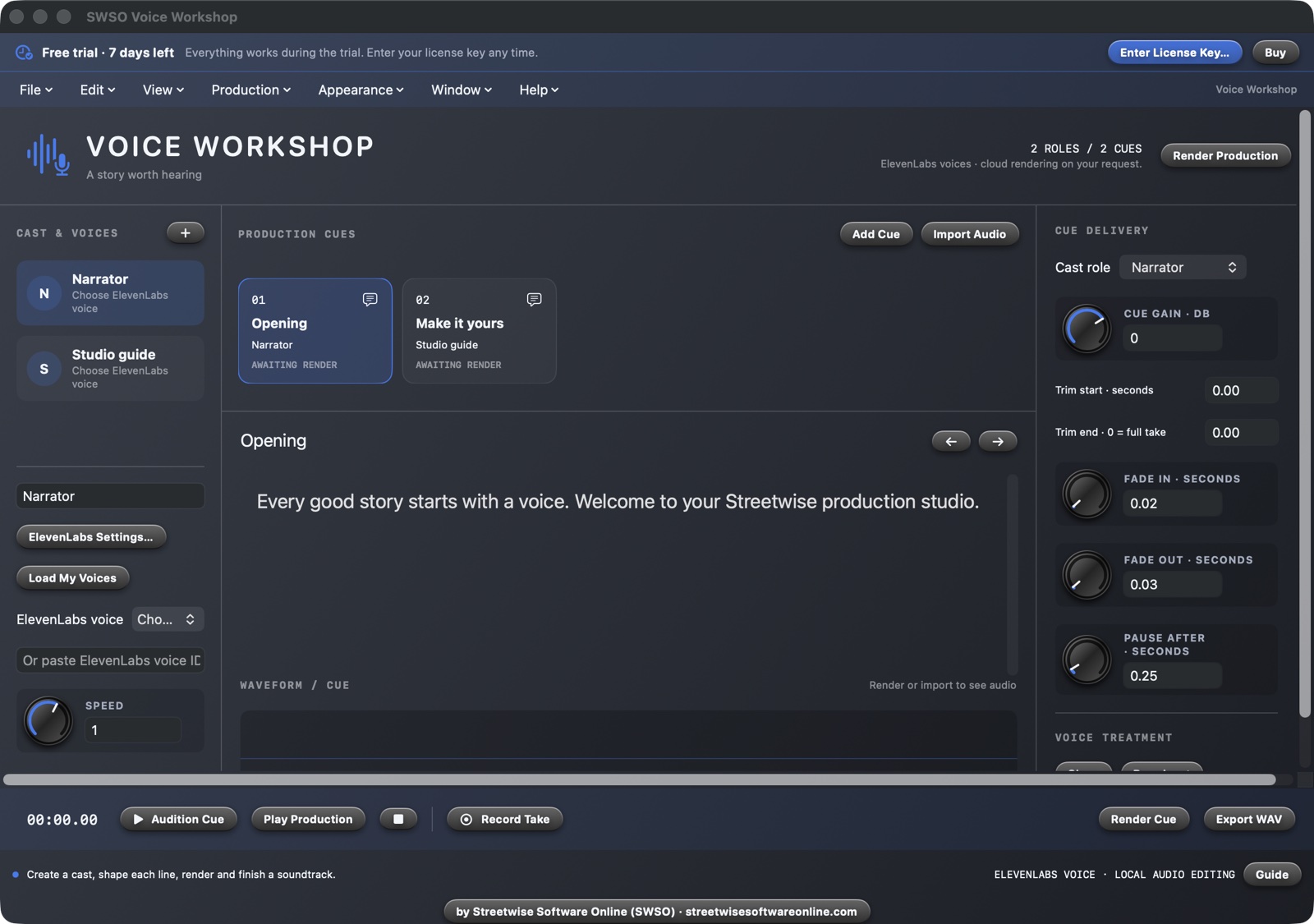
SWSO Voice Workshop with a two-role cast (Narrator and Studio guide), two production cues, the script editor and the Cue Delivery knobs
32 rolesand 128 cues per project
ElevenLabsspeech with your own account and credits
WAV48 kHz / 24-bit mono export

What you get

Cast and script

  • Roles, each with an ElevenLabs voice and speed
  • Cues with a script editor (spelling and grammar checks)
  • Load My Voices or paste a voice ID
  • Your API key is stored in macOS Keychain, not in projects
Shape each line

  • Trim, gain, fades, high-pass, compression and normalization
  • Pause-after spacing between cues
  • Undo and Redo
  • Cues play in sequence

Without the cloud

  • Import WAV, AIFF, CAF, M4A, MP3 and FLAC
  • Record Take with your microphone
  • Collect Project & Audio into a new portable folder
  • Recover unsaved work after a problem

How it works

Open the guided example to see roles and cues, then save a practice project.

  1. Set up voicesProduction → ElevenLabs Settings, save your key, then choose a voice for each role.
  2. Write and renderAdd cues, write the script, then Render Cue (uses your ElevenLabs credits).
  3. Shape and exportAdjust Cue Delivery, set pauses and Export WAV.

Who it’s for

For spoken productions put together line by line.

Storytellers

Narration with more than one voice.

Podcasters and producers

Intros, promos and voice tracks, finished as a WAV.

Teachers and trainers

Clear spoken lessons you can redo one line at a time.

Try it free for 7 days

  • Every feature works for 7 days from the first launch, no key and no sign-up needed
  • After the trial, a license key keeps creating and editing on; you can still open, view and export your work
  • Your key arrives by email after you buy. Enter it with SWSO Voice Workshop → Enter License Key…
  • One-time purchase, no subscription

Specifications

System
macOS 15 Sequoia or later. Built for Intel Macs; on Apple silicon Macs macOS runs it through Rosetta 2
Version
0.1.3
Download
4.9 MB disk image (.dmg), Developer ID signed and notarized by Apple
Speech
ElevenLabs (your own account; uses your credits). No built-in Mac voices
Imports
WAV, AIFF, CAF, M4A, MP3, FLAC, up to 20 minutes per cue
Export
WAV, 48 kHz / 24-bit mono, up to 30 minutes
Projects
.swvoice
License
One-time purchase, $25.99. 7-day free trial. Key entered with SWSO Voice Workshop → Enter License Key…

Questions

Do I need an ElevenLabs account?

  • Only to generate speech. Render Cue sends that cue’s text to ElevenLabs and uses your account credits. You can also import or record audio without it.

Does it clone voices?

  • No. There is no voice cloning and no multitrack overlap editor in this version.

Where is my API key kept?

  • In macOS Keychain. It is never written into project files or backups.

Price

SWSO Voice Workshop by Streetwise Software Online

Download the free trial now. One-time purchase, no subscription.

$25.99 one-time

See all SWSO software

Having a problem? Tell us and we’ll fix it.

Every Mac is a little different, and we fix issues as they come in. If something doesn’t work the way it should, use our contact form and tell us the app, its version, your Mac and macOS version, and what happened. Your report helps us fix it fast, for you and for everyone who uses our software.

Contact us

Product updates & bug reports

Found a bug or an issue? Report it to Streetwise Software Online with the app name, version and steps to reproduce it. We review reports and address confirmed bugs through product updates.

Read product updates and published fixes · Free trial and refund policy