Grand Opening: 20% off until January 31, 2027

SWSO PDF Desk

by Streetwise Software Online · SWSO

Read it, sign it, send it.

Open any PDF, highlight and comment, fill in forms and sign them, reorder, combine and split pages, and make scanned pages searchable. Everything happens on your Mac: no account, no upload, no subscription.

Standard $39.99 $31.99$39.99 · Pro with every add-on $79.99 $63.99$79.99 · one-time price · 15-day free trial

  • Pay once, no subscription
  • Files never leave your Mac
  • Intel and Apple silicon
6add-on packs
250steps of undo
0uploads: your files stay on your Mac
15day free trial
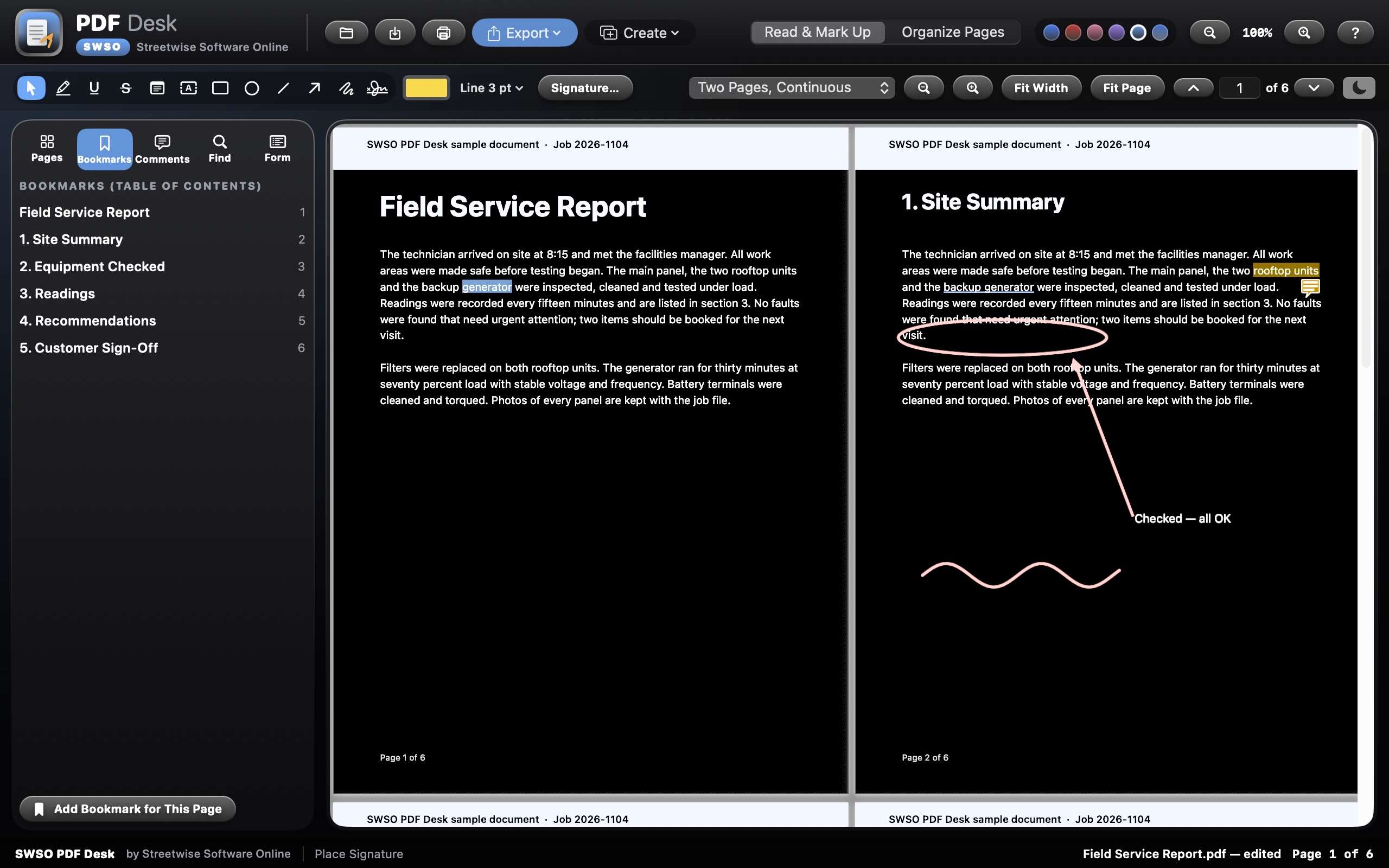
Two pages side by side with night reading on, and the bookmarks panel

Read

Comfortable reading, day or night

Night reading darkens the page for late work, and the layout fits the way you read.

  • Page thumbnails, a bookmarks panel and a page number box
  • Single page, continuous, two pages side by side, or two pages continuous
  • Zoom, Fit Width and Fit Page, with page labels
  • Night reading turns white pages dark
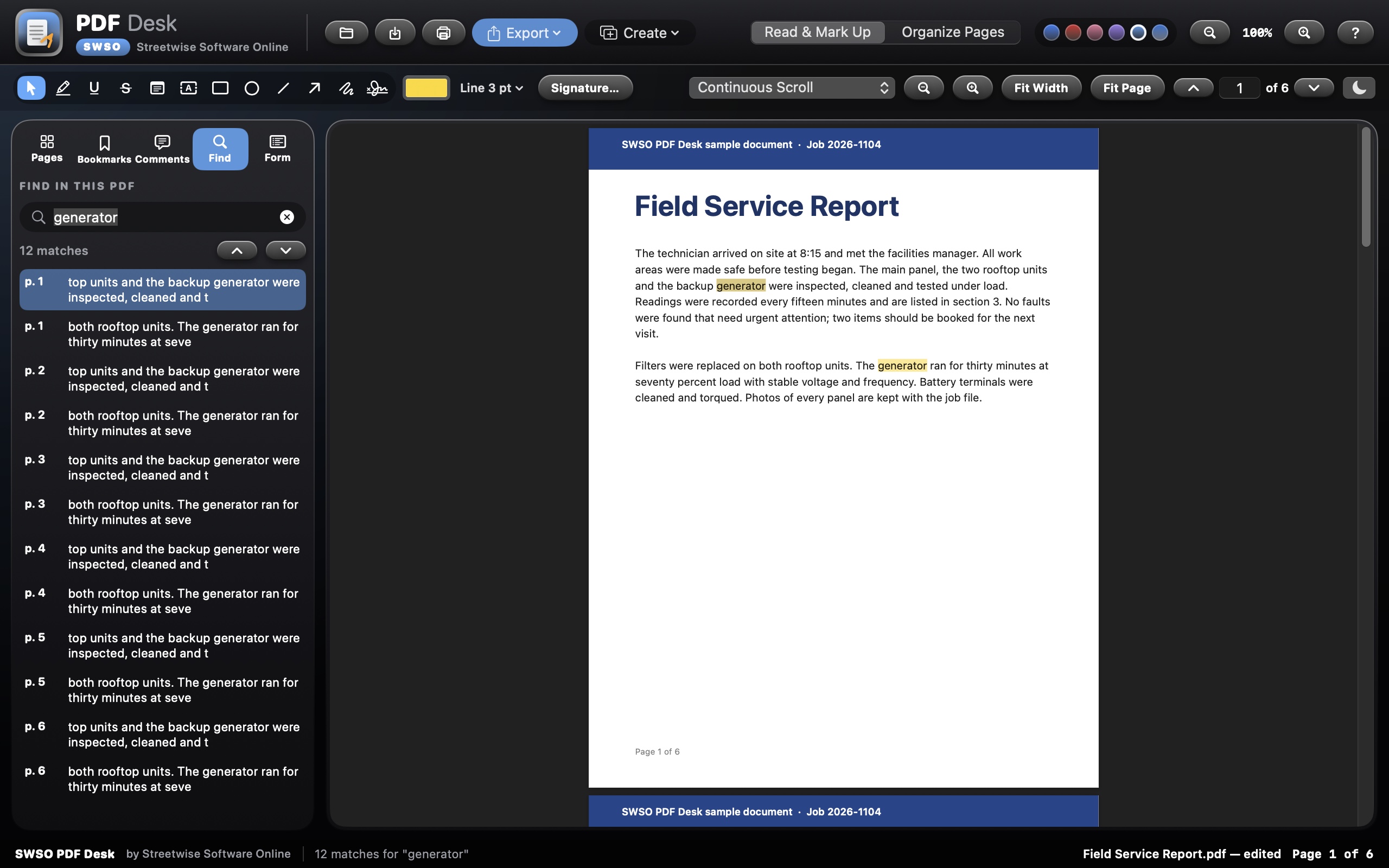
Find panel listing every match for the word generator, highlighted on the page

Find

Find any word, even on scanned pages

Every match is highlighted on the page and listed with the words around it.

  • Find lists each match with its page number, so you jump straight to it
  • Find Next and Find Previous step through the document
  • Text recognition turns scanned pages into text you can search and copy; the page looks the same
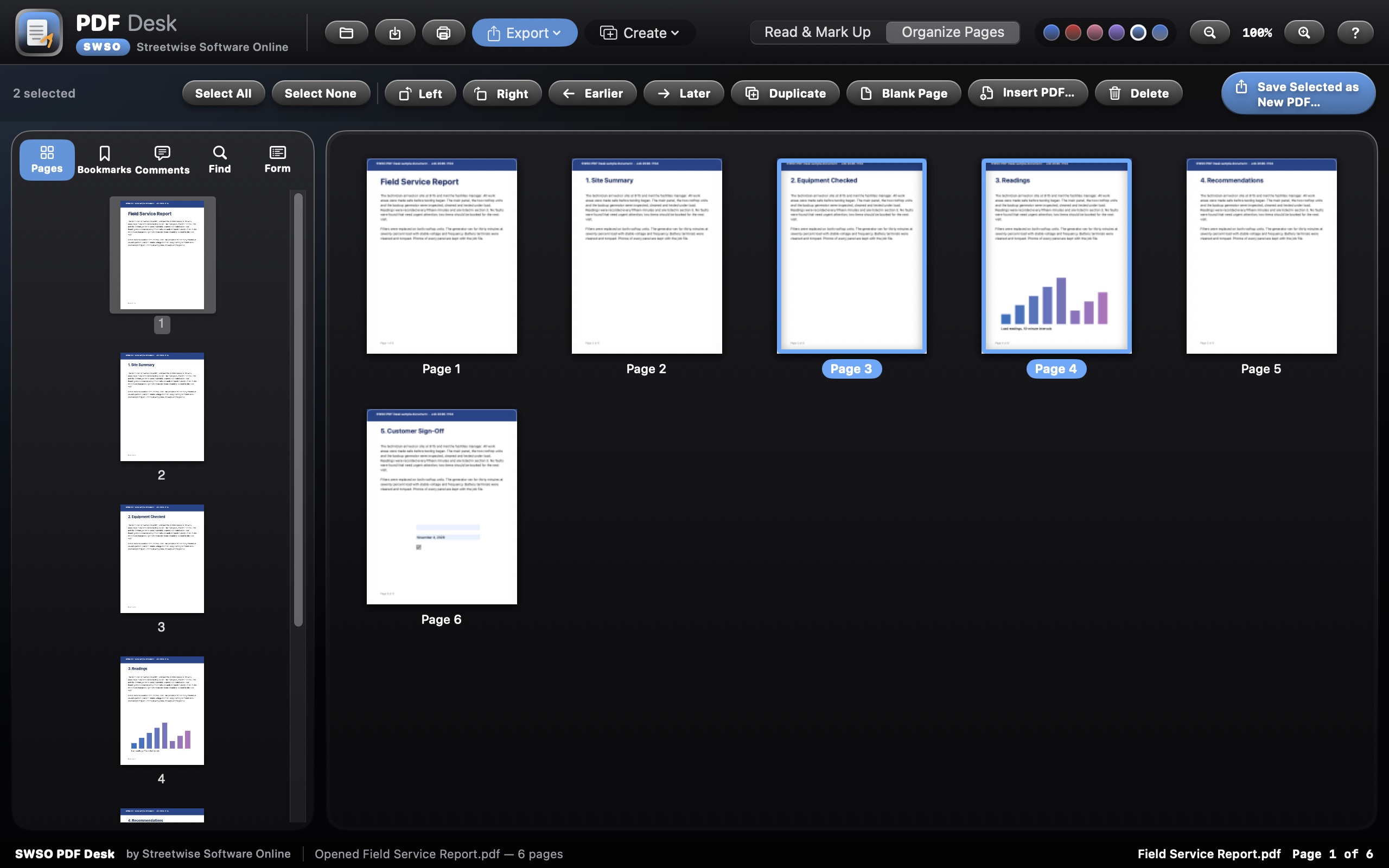
Organize Pages grid with two pages selected

Organize pages

Put pages in order in seconds

A page grid shows the whole document. Drag pages where they belong.

  • Drag pages into a new order, or move them earlier and later
  • Rotate, delete, duplicate or insert blank pages; insert pages from another PDF
  • Save selected pages as a new PDF
  • Combine PDFs into one, split every few pages, by page ranges or one file per page, and turn pictures into a PDF
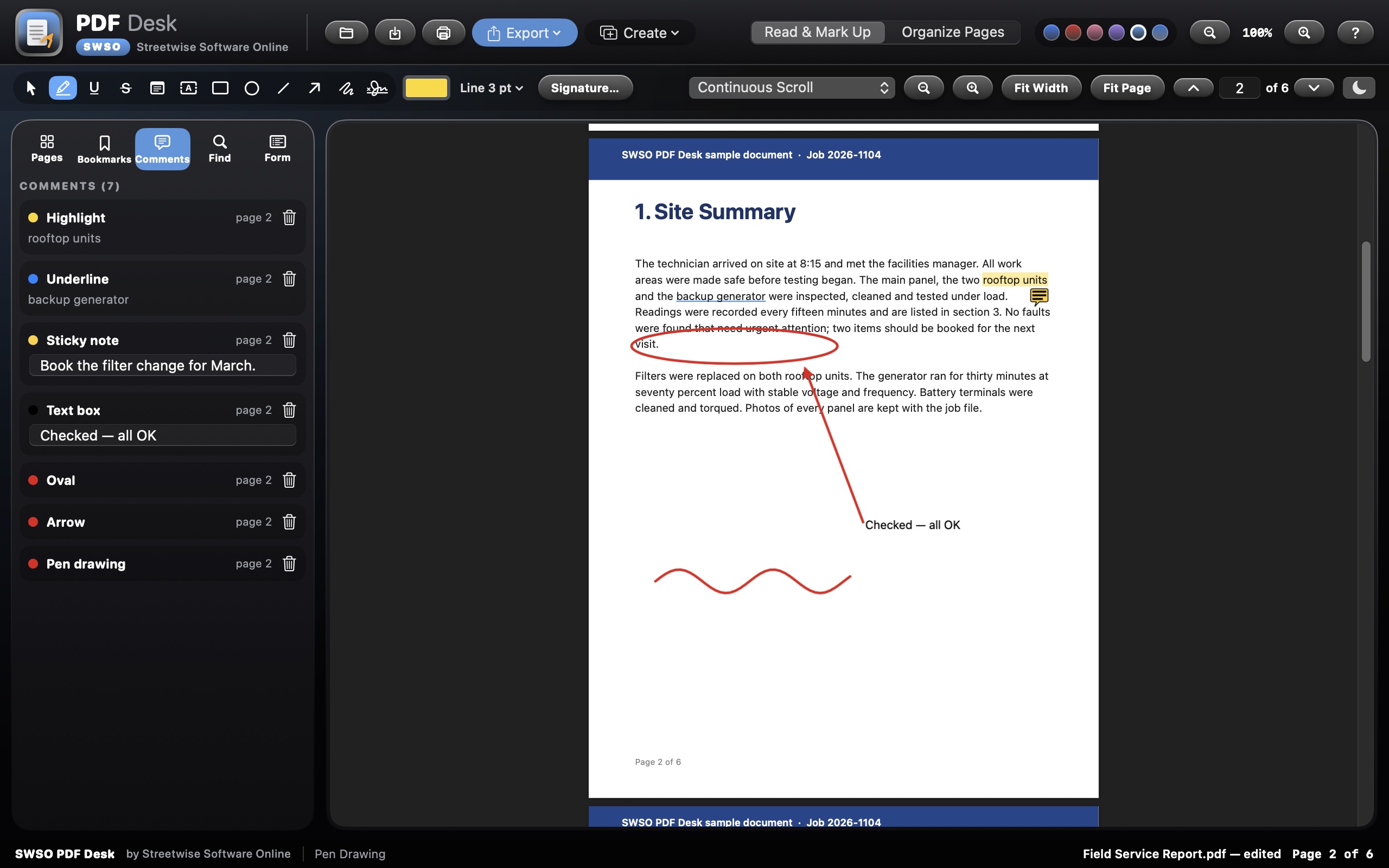
A page with highlights, a sticky note, a text box, shapes and the Comments panel

Mark up

Highlight, comment and draw

Your marks are saved as standard PDF comments, so Preview and other PDF readers show them too.

  • Highlight, underline and cross out, following each line of text
  • Sticky notes and text boxes
  • Rectangles, ovals, lines, arrows and a freehand pen, in any colour and thickness
  • A Comments panel to go to, edit or delete every mark
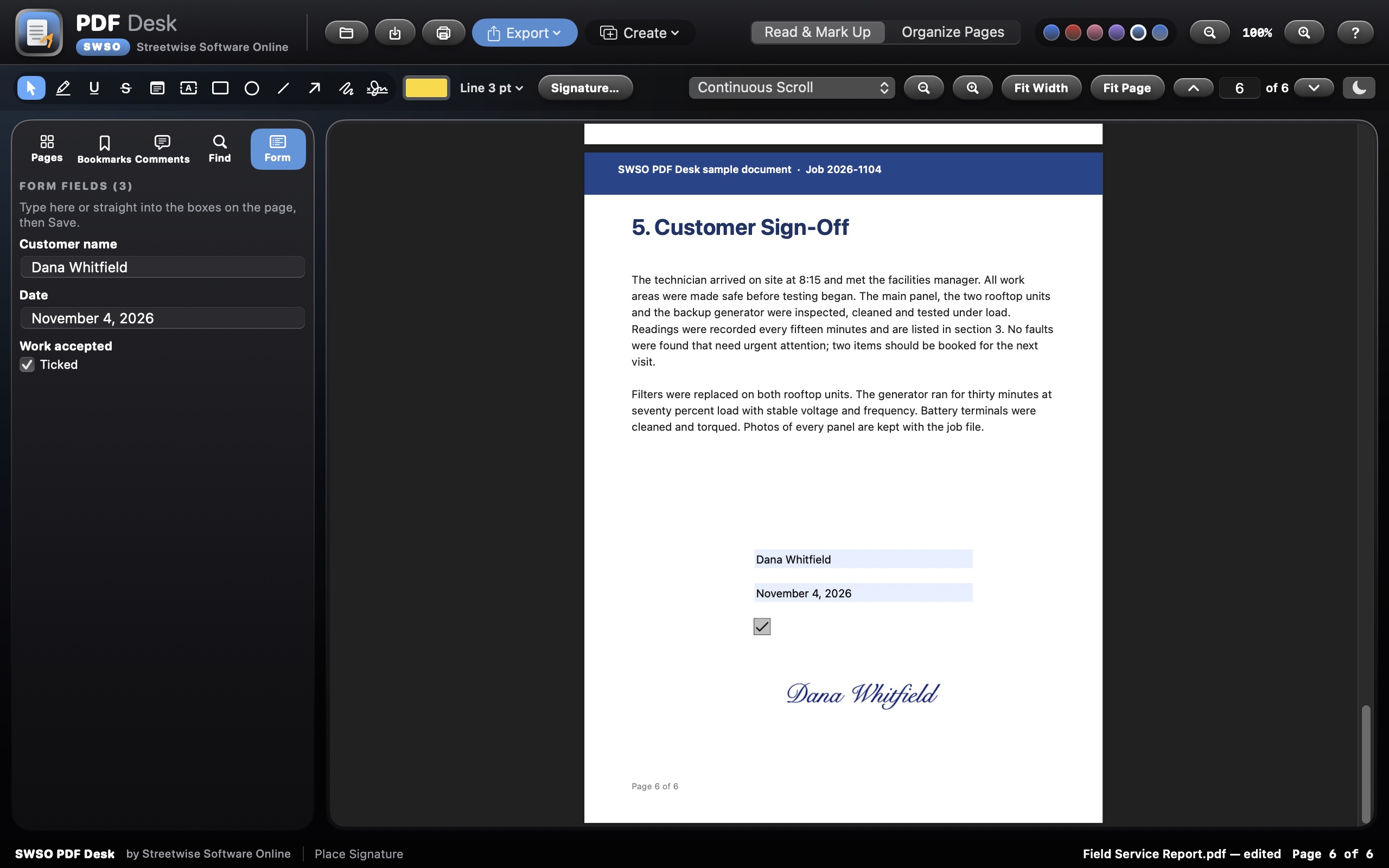
A filled-in sign-off form with a typed signature and the Form panel

Fill in and sign

Fill in forms and sign them

Type straight into the form on the page, then add your signature where it belongs.

  • Type into form fields on the page, or use the Form panel for text fields, check boxes and choices
  • Draw your signature, or type it in a handwriting font
  • Your signature stays on your Mac; click to place it on any page

Also included

  • Open password-protected PDFs, save a password-protected copy, or save a copy without the password
  • Save a smaller copy for email: keep the text sharp, or make it as small as possible
  • Export pages as PNG or JPEG at 72, 150 or 300 dpi, comments included, and print
  • Edit the title, author, subject and keywords, and see page count, page size, PDF version and file size
  • Undo and redo up to 250 steps for page changes, comments, forms and more
  • Safe saving, and drag a PDF onto the window to open it
  • Six colour themes and interface zoom from 85% to 200%
  • Searchable built-in Help with a page for every tool

Add-on packs

More power, inside the same app

Each add-on is built into SWSO PDF Desk itself: no extra download and no plug-in folder. Your license key switches it on. Smart Redact comes free with every edition, and Pro includes every pack.

6 add-ons

5 paid packs worth $89.95 when bought one by one, all included with Pro for $40.00 more than Standard. Smart Redact is free with both.

Free with Standard and Pro

Smart Redact

Find and black out names, numbers, emails and any words you choose, and remove them for good: not just covered up.

  • Search for names, phone numbers, emails, addresses, card and account numbers, or any words and patterns you choose
  • Review every match before anything is changed, then black it out in one click
  • The text under each box is really removed from the PDF, not just covered, so it can't be copied back out
  • Saves a redacted copy and leaves your original untouched

Included in every edition

$19.99 add-on

Scan-to-Fillable

Turn a scanned paper form into a real fillable PDF form, with the boxes found for you.

  • Open a scanned or photographed paper form and the app finds the lines, boxes and checkboxes for you
  • Turns them into real text fields, checkboxes and signature spots anyone can fill in
  • Adjust, add or rename fields before saving
  • Makes the page text searchable at the same time

Included with Pro

$14.99 add-on

Compare PDFs

Put two versions side by side and see every changed word and page highlighted.

  • Open an old and a new version of a contract, quote or plan side by side
  • Every added, removed and changed word is highlighted in colour
  • Added, removed and moved pages are listed so nothing slips past
  • Jump from change to change and save a summary of the differences

Included with Pro

$19.99 add-on

Batch Room

Run the same job on a whole folder: combine, compress, add page numbers, watermark, convert to pictures.

  • Point it at a folder and run one job on every PDF inside
  • Combine, compress for email, add page numbers, stamp a watermark or header, or rotate pages
  • Convert every page to pictures, or pictures into PDFs
  • Save your favourite jobs and run them again with one click

Included with Pro

$19.99 add-on

Contractor Takeoff

Measure lengths and areas on plans and drawings at the drawing's scale, and total them into a list.

  • Set the drawing's scale once, from the title block or a known length
  • Measure lengths, perimeters, areas and counts right on the plan
  • Group measurements by trade or material, with your own labels and colours
  • Total everything into a takeoff list you can export for your quote or estimate

Included with Pro

$14.99 add-on

Read Aloud & Privacy Scrub

Have the Mac read a PDF out loud, and strip hidden data (author, edit history, metadata) before you send it.

  • Have your Mac read a PDF out loud, with the current sentence highlighted, at the speed you like
  • Pick any voice installed on your Mac and save the reading as an audio file
  • Privacy Scrub strips hidden data before you send a file: author, edit history, metadata, comments and attachments
  • Shows you what was found before it removes anything

Included with Pro

Editions

Choose your edition

Grand Opening: 20% off Standard and Pro until January 31, 2027.

SWSO PDF Desk Standard

$39.99 $31.99$39.99

one-time

Every core tool, plus Smart Redact free.

  • Every tool on this page
  • Smart Redact add-on included free
  • Add any add-on pack on its own, any time
  • Free updates for version 1

Creator Suite

$149.00

one-time

SWSO PDF Desk Pro and SWSO Vector Lab Pro together.

  • Both apps, Pro edition
  • Every add-on pack for both apps
  • Two license keys
  • Saves $30.98 on the two Pro editions

Try it free for 15 days

  • Every feature works for 15 days from the first launch, with no key and no sign-up
  • After day 15 the app opens read-only: you can still open, view and export your own work, and nothing is ever deleted
  • A license key unlocks editing again; it is checked on your Mac and works offline

System requirements

System
macOS 13 Ventura or later, Intel and Apple silicon (universal)
Your files
Opened and saved on your Mac. Nothing is uploaded and no account is needed
Signatures
A picture of your signature, drawn or typed. Not a certificate-based digital signature
Free trial
15 days with every feature. After that, viewing, searching, printing and exporting still work; editing needs a license key. Nothing is ever deleted
Help
Searchable built-in Help with a page for every tool
Made by
Streetwise Software Online (SWSO)

Price

SWSO PDF Desk by Streetwise Software Online

One-time purchase, no subscription. Try it free for 15 days first.

$31.99$39.99 Standard, one-time · Pro $63.99$79.99 · Grand Opening prices through Jan 31, 2027

Back to all software

Product updates & bug reports

Found a bug or an issue? Report it to Streetwise Software Online with the app name, version and steps to reproduce it. We review reports and address confirmed bugs through product updates.

Read product updates and published fixes · 15-day trial and refund policy